| Index | Recent Threads | Unanswered Threads | Who's Active | Guidelines | Search |
 |
World Community Grid Forums

 Category: Community

 Forum: Chat Room
 Thread: It's International restart your Windows Cruncher day
 |
| No member browsing this thread |
|
Thread Status: Active Total posts in this thread: 283
|

|
| Author |
|


|
Diana G.
Master Cruncher Joined: Apr 6, 2005 Post Count: 3003 Status: Offline Project Badges: 


|
I don't know why I cannot install these 5 updates that keep failing! I have rebooted at least 10 times and then tried installing them individually....rebooting after each time and only 2 successfully installed. I am wanting to rip my hair out.
---------------------------------------- see here grrrr Thanks for any help! Diana  |
||
|


|
Sekerob
Ace Cruncher Joined: Jul 24, 2005 Post Count: 20043 Status: Offline |
Hi Diana G. of the Cs,
----------------------------------------Reopen Windows Update and click on Show Chronology. It should list a status of the failed installs (click on them). Theoretically the updates are already on your harddisk. Over here things went smooth, the only odd thing being that this machine was off from the 19th thru the 6th, yet gremlins got in and installed something on the 3rd. Did the machine auto-revive and shut down? More irritating, the Update setting is explicitly to only alert for updates and not install and it still went ahead unattended yesterday and installed and booted 10 minutes after. Wonder what squirmin' will come out of Redmond this month on that. Need to 'sack' Bill G. before he finally retires in June  http://img530.imageshack.us/img530/7360/vistaupdatechroniclesrd9.png
WCG
Please help to make the Forums an enjoyable experience for All! |
||
|
|
Diana G.
Master Cruncher Joined: Apr 6, 2005 Post Count: 3003 Status: Offline Project Badges:
|
Hi Sekerob. It is good to see you back :)
----------------------------------------No, my pc was already on when the updates became available. When I noticed (around 4 pm), I just did the normal things. I am fairly sure I 'allowed' the updates through the firewall (I was talking on my cell phone LoL) and rebooted. ... was notified of failures. So I kept trying... Here is the list you wanted: Status of updates Thank you! I wonder too, how updates can be done to a computer that is off. Seems we get something new to shake our heads in wonder at each month LoL Have an awesome day~ edit: D'oh!! I just double clicked on those fails and see error codes...wiill find the offendind udate that is preventing the others to install... I'll be back hahahaha [Edit 1 times, last edit by Diana G. at Jan 9, 2008 4:40:18 PM] |
||
|
|
Diana G.
Master Cruncher Joined: Apr 6, 2005 Post Count: 3003 Status: Offline Project Badges:
|
Hahahhaha tooooo funny! This NEEDS to be installed seperately from the other updates first so all the other updates will install correctly! LOLOLOLOL
----------------------------------------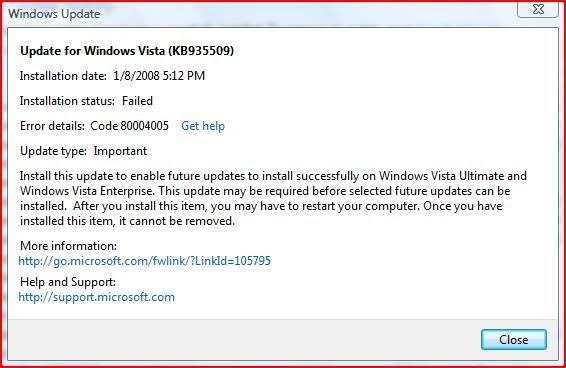 How come I don't know this beforehand? I'm going to install this one, and then the others... brb |
||
|
|
Sekerob
Ace Cruncher Joined: Jul 24, 2005 Post Count: 20043 Status: Offline |
Since reading that you got ahold of Comodo, there is an install mode (will remind you to switch to normal mode or will switch back automatic). That install mode temporarily stops all install alerting. Look in the Firewall log if something got blocked but doubt that very much.
----------------------------------------Your screenshot at top has actually a link on how to resolve your problems. Don't know if selecting a failed install patch and right clicking will bring up some error code as I've none listed, so please try out. What antivir? Have considered Comodo 2.0, but it is still beta AND has no email client scanning yet, so stuck with Avast on Vista. Reading of Kaspersky being a nuisance again this week. ttyl
WCG
Please help to make the Forums an enjoyable experience for All! |
||
|
|
Diana G.
Master Cruncher Joined: Apr 6, 2005 Post Count: 3003 Status: Offline Project Badges:
|
Okay, all but 1 installed. Each one had to be done singly.
----------------------------------------1 fails... (The error code is not even listed when I click the get help, so googled it, and it is a vague code for possible interference with another program on your pc.) ***Okay...I am downloading the update from MS website...I think the one that wouldn't install is for Windows Vista 64 when I have Vista 32. That's what the workaround said... Let's see if it works....... Sekerob, I usually do click on Comodo's intall mode, but I forgot to click that cuz I was on the phone... I use Avira AntiVir for my antivirus. Thank you for all your help :) Mr. Dee Pee Cee I'll let you know if this works. |
||
|
|
Sekerob
Ace Cruncher Joined: Jul 24, 2005 Post Count: 20043 Status: Offline |
.... and who's testing for WCG on Vista?
----------------------------------------Windows, Windows x64, 5.10.35 Rom Walton wrote: Howdy Folks, We have a new 5.10 release we need to get out in the field ASAP. A few projects have been suffering from some vista shutdown issues. Apparently we didn’t get a few of the various error code vista returns to BOINC when the system shuts down. We need to turn this release around pretty quick, so please test it as soon as possible. Please make sure you hit both the single-user install scenario and the service-mode install scenario. Also make sure to reboot your computer a few times while processing workunits. Please report test results to http://boinc.berkeley.edu/alpha and log bugs to http://boinc.berkeley.edu/trac. TIA. As an aside, did anybody running vista encounter work-unit failures as a result of rebooting their computer? Sorry Diana, see i've been getting forum updates at negative warp (which is normal here).... you uncovered most i see now. That particular update 935509 is strange as your screenshot suggest you got Vista Business or Ultimate The sequence of patching was supposed to have been fixed automatically and this one would demonstrate it's not. It took me ages on the clean XPpro install this autumn with 114 patches+SP2 to figure out the right order. Some actually had to be applied before and some after SP2 as well.
WCG
----------------------------------------Please help to make the Forums an enjoyable experience for All! [Edit 1 times, last edit by Sekerob at Jan 9, 2008 6:40:50 PM] |
||
|
|
Diana G.
Master Cruncher Joined: Apr 6, 2005 Post Count: 3003 Status: Offline Project Badges:
|
Sekerob, the workaround did indeed work :) Yay!
----------------------------------------But the update still wants to think it didn't. So now I need to hide it, but don't know how... Hugs to you!!! Diana I have to leave for an appointment, so I'll be back later. |
||
|
|
Sekerob
Ace Cruncher Joined: Jul 24, 2005 Post Count: 20043 Status: Offline |
On the XP it (Belarc) tells me i have to re-install 2 patches, but when i try it tells me i have them. Uninstalled them and reinstalled them and it still tells me, so like you i just hid them. Since, its been telling me I've got important updates hidden.... OFLMBO
----------------------------------------
WCG
Please help to make the Forums an enjoyable experience for All! |
||
|
|
Diana G.
Master Cruncher Joined: Apr 6, 2005 Post Count: 3003 Status: Offline Project Badges:
|
Gotta keep laughing don't we?
---------------------------------------- Thanks for all your help. I have done things I never did before so it has been good ultimately. I never would have been able to do it though without you! Fantastico my amico! |
||
|
|
|