| Index | Recent Threads | Unanswered Threads | Who's Active | Guidelines | Search |
 |
World Community Grid Forums

 Category: Support

 Forum: GPU Support Forum
 Thread: Graphics Card Performance
 |
| No member browsing this thread |
|
Thread Status: Active Total posts in this thread: 254
|

|
| Author |
|


|
Bearcat
Master Cruncher USA Joined: Jan 6, 2007 Post Count: 2803 Status: Offline Project Badges: 


|
Just gave it a try but not crunching more than one. I did change it to .5 but don't see any changes. Will it start both at the same time or will it slip the second one in whenever it tries to catch it? Will it show anything in the message center that it read the app info file? I don't see any references to it.
----------------------------------------
Crunching for humanity since 2007!
 |
||
|


|
Former Member
Cruncher Joined: May 22, 2018 Post Count: 0 Status: Offline |
1. Did you shut down BOINC Manager completely and restart?
2. Is the app_info.xml file in the ProgramData-BOINC-data-projects-www.worldcommunitygrid.org directory? You should see something like this: 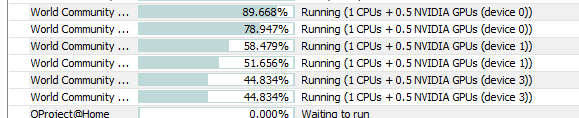 |
||
|
|
Bearcat
Master Cruncher USA Joined: Jan 6, 2007 Post Count: 2803 Status: Offline Project Badges:
|
I have it with the other xml files and config files. I have the wu files crunching on a second disk, which is where I found the correct folder (I hope). At first it was on the C drive but after reading your response, looked again and saw where it should have went. I shut down, rebooted. Still only one crunching.
----------------------------------------
Crunching for humanity since 2007!
|
||
|
|
Former Member
Cruncher Joined: May 22, 2018 Post Count: 0 Status: Offline |
When you shut down the Manager, did it shut completely? I have had a couple of times where it somehow stayed running in the background and I had to go to the Task Manager to stop it.
The file needs to be in the correct folder for it to be recognized, so you do have to make sure you have it right. I'm not sure if you can remember where you told it to keep the Data files during the initial installation. The file for WCG projects needs to be in the subdirectory www.worldcommunitygrid.org. Without knowing your particular choices during install or being able to see you directory stucture, I cannot provide any more detailed direction, sorry. In your message earlier, you stated you put in .5. I'm not sure if would make a difference, but is it .5 or 0.5? Another think to look for in Manager is in the Application column when viewing the Tasks it should start with "Local:..." if it recognized an app_info.xml file. |
||
|
|
mmstick
Senior Cruncher Joined: Aug 19, 2010 Post Count: 151 Status: Offline Project Badges: 


|
Running 9 work units on a single HD 7950, processing time down to 23 seconds per completed work unit, already averaging 700,000+ WCG PPD off one card. Meanwhile, MSI Afterburner shows no droops in GPU usage, stays around 90% usage.
---------------------------------------- Now for my problem. I have too many tasks pending validate...and it keeps getting higher and higher. (~300 increase every day). Yesterday I had 900 tasks pending validation, right now I have 1260 tasks pending validation. I fear the worst... My wingmen need to upgrade their crappy machines, and upgrade fast.... Need more AMD users here. [Edit 1 times, last edit by mmstick at Oct 21, 2012 2:42:19 AM] |
||
|
|
deltavee
Ace Cruncher Texas Hill Country Joined: Nov 17, 2004 Post Count: 4894 Status: Offline Project Badges: 


|
Please read the forum rules especially the one that says "Please do not include graphics which exceed 600x600 pixels...".
|
||
|
|
Former Member
Cruncher Joined: May 22, 2018 Post Count: 0 Status: Offline |
OMG!!!! 9? I guess you aren't doing any other work on that computer, or at least not much. Unless you have more than a Ht Hex Core CPU.
----------------------------------------EDIT: Wait a minute? "Processing time is down to 23 seconds"? I'm not following how it is possible to reduce the processing time by increasing the number of units running at once. My processing time increases for every extra unit. Please explain. Thanks. [Edit 1 times, last edit by Former Member at Oct 21, 2012 2:56:09 AM] |
||
|
|
nanoprobe
Master Cruncher Classified Joined: Aug 29, 2008 Post Count: 2998 Status: Offline Project Badges: 


|
I have it with the other xml files and config files. I have the wu files crunching on a second disk, which is where I found the correct folder (I hope). At first it was on the C drive but after reading your response, looked again and saw where it should have went. I shut down, rebooted. Still only one crunching. It has to go into the www.worldcomunnity.org project folder not where the the config or other xml files are. If you're running WUs on a separate drive that may be the issue. Never tried that one.
In 1969 I took an oath to defend and protect the U S Constitution against all enemies, both foreign and Domestic. There was no expiration date.
  |
||
|
|
Bearcat
Master Cruncher USA Joined: Jan 6, 2007 Post Count: 2803 Status: Offline Project Badges:
|
When you shut down the Manager, did it shut completely? I have had a couple of times where it somehow stayed running in the background and I had to go to the Task Manager to stop it. The file needs to be in the correct folder for it to be recognized, so you do have to make sure you have it right. I'm not sure if you can remember where you told it to keep the Data files during the initial installation. The file for WCG projects needs to be in the subdirectory www.worldcommunitygrid.org. Without knowing your particular choices during install or being able to see you directory stucture, I cannot provide any more detailed direction, sorry. In your message earlier, you stated you put in .5. I'm not sure if would make a difference, but is it .5 or 0.5? Another think to look for in Manager is in the Application column when viewing the Tasks it should start with "Local:..." if it recognized an app_info.xml file. Shut down completely. Doesn't this file go in the same place where global prefs and such files reside? I installed boinc on C drive but data is on another drive. That drive has a boinc folder with 3 folders (notices, projects, slots) with the rest single files (all_project_list, client_state, etc), which is where I put the app info file. Inside the project list folder resides the www.worldcommunitygrid.org folder. Is this where it belongs?
Crunching for humanity since 2007!
|
||
|
|
Former Member
Cruncher Joined: May 22, 2018 Post Count: 0 Status: Offline |
Yes, inside the www.worldcommunitygrid.org folder.
|
||
|
|
|