| Index | Recent Threads | Unanswered Threads | Who's Active | Guidelines | Search |
 |
World Community Grid Forums

 Category: Support

 Forum: BOINC Agent Support
 Thread: Need specific instructions for using BOINC in dual boot scenario
 |
| No member browsing this thread |
|
Thread Status: Active Total posts in this thread: 23
|

|
| Author |
|


|
Former Member
Cruncher Joined: May 22, 2018 Post Count: 0 Status: Offline |
I have a system that I am transitioning from Windows 2000 to Windows XP. During the transition, I would like to have BOINC and WCG processing the same work units; in other words, I would like to now install BOINC and WCG in the Windows XP instance and direct it to process work from the same folder(s) as the instance that is installed in Windows 2000.
I have searched these forums, as well as Google; I can clearly see that others have successfully done this, but none of the discussions I found of it ever bothered to condense the necessary steps to doing it successfully. Virtually all them them took the form: "Can I do this?" "No, you can't." "Wait a second, maybe he can...." "I did it, it works!" No one ever described in detail how it was done. I don't want to make another time-wasting trial-and-error project out of this... I just want to quickly do it and know that it will work. Can someone please help rectify this glaring omission from the common knowledgebase by detailing the requirements and process here? Let's get this into the public record here in a fashion that benefits not only me but everyone else who will consider this in the future. Then, when it's confirmed, let's get it recorded into the FAQ so that it's even easier for people to find it! |
||
|


|
Former Member
Cruncher Joined: May 22, 2018 Post Count: 0 Status: Offline |
All you want to do is have both operating systems use the same data?
This is easy. 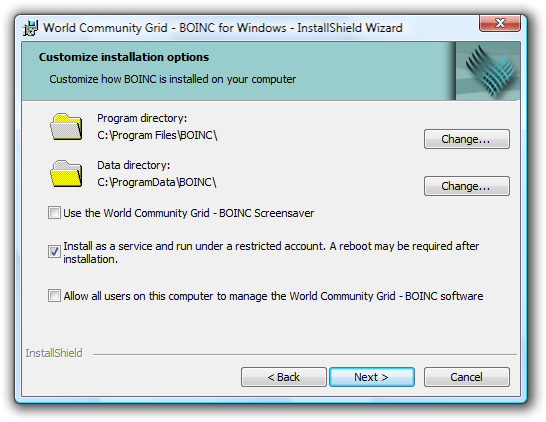 Use the same data directory during installation. Assuming you already have BOINC on Windows 2000, identify your current data directory using these directions: http://wcg.wikia.com/wiki/Data_directory Use this directory for your new installation. |
||
|
|
Sekerob
Ace Cruncher Joined: Jul 24, 2005 Post Count: 20043 Status: Offline |
I have a system that I am transitioning from Windows 2000 to Windows XP. During the transition, I would like to have BOINC and WCG processing the same work units; in other words, I would like to now install BOINC and WCG in the Windows XP instance and direct it to process work from the same folder(s) as the instance that is installed in Windows 2000. I have searched these forums, as well as Google; I can clearly see that others have successfully done this, but none of the discussions I found of it ever bothered to condense the necessary steps to doing it successfully. Virtually all them them took the form: "Can I do this?" "No, you can't." "Wait a second, maybe he can...." "I did it, it works!" No one ever described in detail how it was done. I don't want to make another time-wasting trial-and-error project out of this... I just want to quickly do it and know that it will work. Can someone please help rectify this glaring omission from the common knowledgebase by detailing the requirements and process here? Let's get this into the public record here in a fashion that benefits not only me but everyone else who will consider this in the future. Then, when it's confirmed, let's get it recorded into the FAQ so that it's even easier for people to find it! After you've gained the experience, would you be willing to Volunteer and write the FAQ? In amongst, yes you can (Windows-Windows), no you can not, latter is not possible for cross-platform. Some want to share their tasks in dual boot between Windows and Linux. That can't work and even if it would run, the results wouldn't be exactly equal. The way BOINC is structured in it can't ever work and even if it were, the different platforms during periods of transition, new version of science, would not be using the same science executable to start and finish the task. Let us know.
WCG
Please help to make the Forums an enjoyable experience for All! |
||
|
|
oliverstirling
Advanced Cruncher United Kingdom Joined: May 7, 2007 Post Count: 107 Status: Offline Project Badges: 


|
I apologise if I'm being incredibly dense and or stupid but if you set the directory for the new o.s. boinc installation to the same as that of the first boinc o.s. installation won't this cause problems for the first o.s. as the program files and presumably wu files will be overwritten?
Also there may be a problem with later versions of windows seeing an older o.s. hard drive or partition. For example my windows 7 installation can't see the drive my Vista os is installed on. Of course I may be the exception but I thought it might be worth pointing out. |
||
|
|
Former Member
Cruncher Joined: May 22, 2018 Post Count: 0 Status: Offline |
The program directory is separate. The data directory is not overwritten by a new installation.
For this scenario to work, the data directory must be kept on a drive that is visible to both operating systems. |
||
|
|
oliverstirling
Advanced Cruncher United Kingdom Joined: May 7, 2007 Post Count: 107 Status: Offline Project Badges:
|
Ah, thank you. Might give that a try now
|
||
|
|
oliverstirling
Advanced Cruncher United Kingdom Joined: May 7, 2007 Post Count: 107 Status: Offline Project Badges:
|
Have got my dual boot with Vista and 7 with the boinc data folder on a partition visible to both o.s. Only query is that I'm running vista 32 bit and 7 64 bit resulting in this message when I switch between vista and 7:
----------------------------------------02/06/2009 21:07:16 Platform changed from windows_intelx86 to windows_x86_64 Is this likely to cause any problems? [Edit 1 times, last edit by oliverstirling at Jun 2, 2009 8:21:17 PM] |
||
|
|
JmBoullier
Former Community Advisor Normandy - France Joined: Jan 26, 2007 Post Count: 3716 Status: Offline Project Badges:


|
02/06/2009 21:07:16 Platform changed from windows_intelx86 to windows_x86_64 Is this likely to cause any problems? While waiting for an authorized answer from a WCG tech I would say "no". I don't remember having read significant differences on the way WUs are handled in WCG between 32 and 64 versions of either Windows or Linux. I think that this warning would become significant if WCG were distributing different versions of WUs but right now WCG distributes 32-bit WUs only. Cheers. Jean. |
||
|
|
Former Member
Cruncher Joined: May 22, 2018 Post Count: 0 Status: Offline |
This entire discussion has proceeded exactly the way I didn't want it to go: no authoritative answers at all. I actually made the mistake of believing that the process would be as simplistic as suggested here; just as I'd had originally feared, IT'S NOT AT ALL SIMPLE.
I can't get it to function in both. First, BOTH VERSIONS OF THE CLIENT MUST BE THE SAME; if they aren't, you lose ALL the work in progress and downloaded. Even when both versions are made identical, it will work in one OR the other, but not both. Whichever instance was installed last manages to SOMEHOW invalidate the ability of the other BOINC client to run: the -daemon service starts, but then fails a minute later. I'm talking about 6.2.28, of course. I also had to endure this bug in the process: http://boinc.berkeley.edu/trac/ticket/789 which wasn't an issue with 5.10 that I had been using previously. I've had exactly the consequences I had wanted to avoid: considerable lost personal time, not to mention invalidated work units and lost processing time. Something tells me I'm not done losing time yet, unless I just quit altogether, which I am now seriously considering. Should I be the guy to author the FAQ for the process? How CAN I, when I don't even know WHY it's not working? I'm thoroughly pissed right now. |
||
|
|
Former Member
Cruncher Joined: May 22, 2018 Post Count: 0 Status: Offline |
This isn't true: the versions don't have to be identical. However, you would be ill-advised to mix major versions. Why are you using 5.10 at all? Our instructions assumed you would use our recommended version.
You are trying to make this someone else's fault, instead of asking for help as soon as you encounter difficulties. Don't make things difficult for yourself. Ask for help. |
||
|
|
|