| Index | Recent Threads | Unanswered Threads | Who's Active | Guidelines | Search |
 |
World Community Grid Forums

 Category: Support

 Forum: BOINC Agent Support
 Thread: "Earliest Deadline First" processing of Tasks
 |
| No member browsing this thread |
|
Thread Status: Active Total posts in this thread: 14
|

|
| Author |
|


|
Former Member
Cruncher Joined: May 22, 2018 Post Count: 0 Status: Offline |
I would very-much like to see an option to force processing of tasks that are due soonest, first. Not interrupt currently running tasks (unless marked High-Priority when downloaded), but when the currently running task finishes, the next WU that core starts running should be the one that's due soonest.
One would think the FAQ subject titled "Earliest Deadline First" processing of Tasks (See also "Running - High Priority") would address this, but the links it contains appear to have nothing to do with it. I find no way to force this behavior using options in the cc_config.xml file, either. e.g. right now there are 2 WU's with deadlines of 05-29 sitting in the queue of a dual core machine and those WU's have been there for a couple days now... one core is currently working on a WU due 06-05, and the other is working on a WU due 06-07, and both of those WU's were begun about a half-hour ago... while the WU's with the deadline of 05-29 continue to just sit there (probably causing someone's results to remain PV status). Any way to accomplish this goal? (i.e. without manually suspending the tasks that are due later.) Thanks. |
||
|


|
Sekerob
Ace Cruncher Joined: Jul 24, 2005 Post Count: 20043 Status: Offline |
First, no task is marked by the sender as high priority. It's the client scheduler that does that based on the deadline tasks are given and estimated run times each task comes with [derived from the FPOPS in the task header].
----------------------------------------EDF is a state whereby the scheduler has determined that work is not going to meet the deadline unless processed by high priority and often occurring because users have been interfering with the scheduling or have been loading up too much work into their cache...e.g. pulling 5 days of works with a deadline of e.g. 2 days. As for your task sitting there due on the 29th, it will get started. No one is waiting but the micro manager. Work Units will get started in order of FIFO unless the client determines that conditions have changed, e.g. the computer was off for for instance 12 hours. You can make the suggestion at the Berkeley developers forum where quite a few have gone before asking the same. It's not going to happen as the implications are grave for anyone who has more than one active project attached to the client. BOINC is not made for micromanaging. BOINC is made to set and forget and let it use idle cycles.
WCG
Please help to make the Forums an enjoyable experience for All! |
||
|
|
Former Member
Cruncher Joined: May 22, 2018 Post Count: 0 Status: Offline |
As for your task sitting there due on the 29th, it will get started. No one is waiting but the micro manager. Work Units will get started in order of FIFO unless the client determines that conditions have changed, e.g. the computer was off for for instance 12 hours. If they're processed FIFO, how does it happen that WU's with deadlines of 05-27 and 05-29 from the same project are received after WU's with deadlines of 06-05 and 06-07 ? (right now it's running WU's with deadlines of 06-08 and 06-09 while one of the WU's from 05-29 is still in the queue.) I guess I forgot to mention in the OP that all the WU's are from the same project.  I don't feel it's ''micromanaging'' to desire a general behavior like processing first the WU's from the same project that are due soonest. |
||
|
|
Sekerob
Ace Cruncher Joined: Jul 24, 2005 Post Count: 20043 Status: Offline |
Those 5.27/5.29 tasks are very probably rush/repair/make-up jobs. Just look in the quorum detail or look at the suffix of the task. If it's for instance _02 either _00 or _01 had a problem or was not reported in time, so your machine is called to do the missing job(s), when they're up for processing "in the queue" according FIFO principle or when a High Priority condition develops, e.g. a task that was expected to do 6 hours suddenly doing 60 hours. Then the long job will be pre-empted for the scheduler always tries to finish a job, any job, 24 hours before the deadline.
----------------------------------------29th, my guess is a HCMD2 job 27th, any of the other WCG projects.
WCG
----------------------------------------Please help to make the Forums an enjoyable experience for All! [Edit 1 times, last edit by Sekerob at May 25, 2009 2:29:20 PM] |
||
|
|
Ingleside
Veteran Cruncher Norway Joined: Nov 19, 2005 Post Count: 974 Status: Offline Project Badges: 


|
Any way to accomplish this goal? (i.e. without manually suspending the tasks that are due later.) This is very easily accomplished... ... just set your cache-size to 0.01 days, and you'll finish the current task, and start on the task with earliest deadline... Ok, this wouldn't always work if you're running multiple BOINC-projects, but if you're only running WCG, you'll get your desired behaviour. Now, to have a couple days cache, but still run the tasks in order of deadline, you can do: 1; De-select HCMD2. Since this is the only project with longer deadline than the others, if you don't crunch HCMD2, the tasks should come in order. 2; To make sure you'll not get any re-issue-work with shorter deadline, set "Computer is connected to the Internet about every N days" to 3.1 days (or higher). And, there's even a couple "tricks" you can use to make sure computer always runs all WCG-work "high priority", neither is recommended, and especially #2 is definitely not recommended: 1; Downgrade to v5.8.16, and set "Computer is connected to the Internet about every N days" to 5 days. or 2; Set "Computer is connected to the Internet about every N days" to 9.6 days (in v5.10.xx - v6.6.xx). (too big chance to download too much work than can be finished by the deadline...)  "I make so many mistakes. But then just think of all the mistakes I don't make, although I might." [Edit 1 times, last edit by Ingleside at May 25, 2009 4:21:09 PM] |
||
|
|
Former Member
Cruncher Joined: May 22, 2018 Post Count: 0 Status: Offline |
2; To make sure you'll not get any re-issue-work with shorter deadline, set "Computer is connected to the Internet about every N days" to 3.1 days (or higher). Thanks, but I do not find that particular setting anywhere in the WCG version of BOINC Manager (6.2.28). |
||
|
|
Former Member
Cruncher Joined: May 22, 2018 Post Count: 0 Status: Offline |
In the network tab.
Using BOINC Manager advanced view, click Advanced -> Preferences. Or, use the online settings here: https://secure.worldcommunitygrid.org/ms/devi...iguration.do?name=Default Click "Custom". Remember to clear the local preferences set in BOINC Manager if you do this. Yes, the BOINC preferences system is designed so that as few people can use it as possible. |
||
|
|
Former Member
Cruncher Joined: May 22, 2018 Post Count: 0 Status: Offline |
In the network tab. Using BOINC Manager advanced view, click Advanced -> Preferences. Yep... that's where I was looking, and I don't find an option called ''Computer is connected to the Internet about every N days'' Here's the 'network usage' tab in my copy of 6.2.28 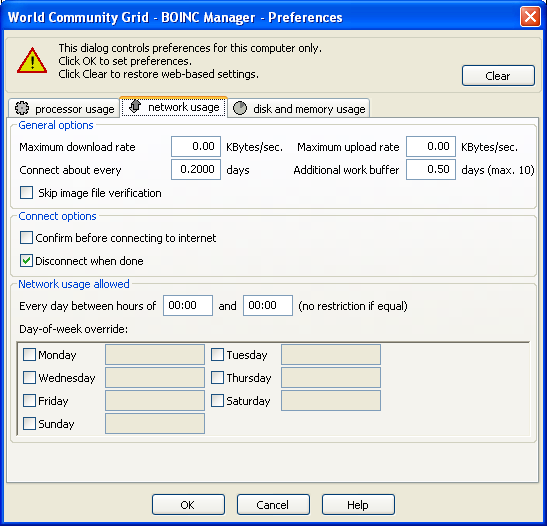 Here's the 'processor usage' tab 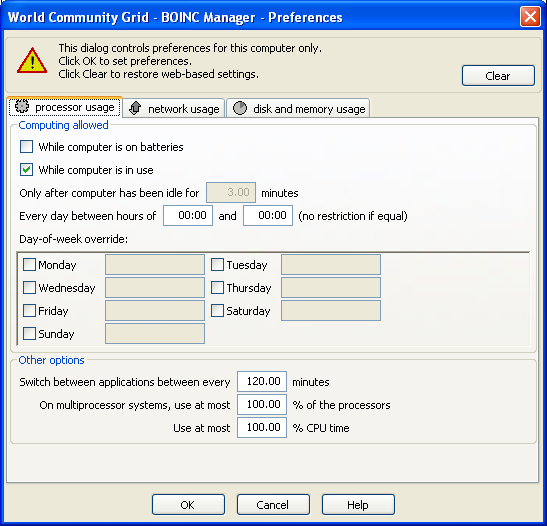 and here's the 'disk and memory usage' tab 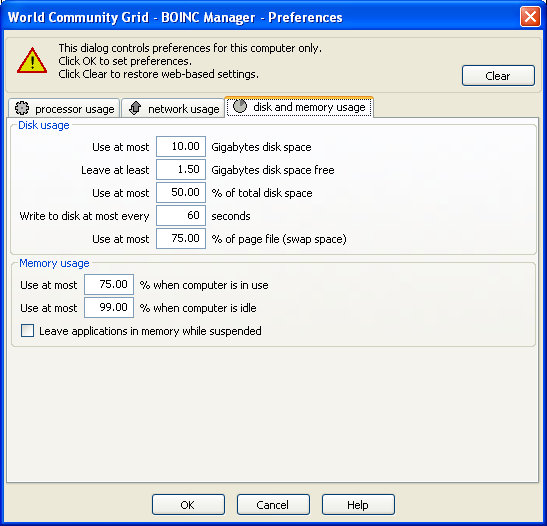 Careful, now... if it's the option I think you mean, the last time I mentioned it the thread got moved to chat. (http://www.worldcommunitygrid.org/forums/wcg/viewthread?thread=25688) |
||
|
|
Former Member
Cruncher Joined: May 22, 2018 Post Count: 0 Status: Offline |
|
||
|
|
Former Member
Cruncher Joined: May 22, 2018 Post Count: 0 Status: Offline |
If that's what you're going to call the FAQ now, why isn't there a link to it in the http://www.worldcommunitygrid.org/forums/wcg/listthreads?forum=3 forum and at the top of the http://www.worldcommunitygrid.org/forums/wcg/viewthread?thread=21501 thread there? Thanks. |
||
|
|
|