| Index | Recent Threads | Unanswered Threads | Who's Active | Guidelines | Search |
 |
World Community Grid Forums

 Category: Support

 Forum: GPU Support Forum
 Thread: intermittent pauses
 |
| No member browsing this thread |
|
Thread Status: Active Total posts in this thread: 31
|

|
| Author |
|


|
Jack007
Master Cruncher CANADA Joined: Feb 25, 2005 Post Count: 1604 Status: Offline Project Badges: 


|
This is sorta along the lines of the pauses,
----------------------------------------so I'll throw this in here instead of a new thread. I put a 7750 in my I7 2500K (no overclock) win 7 64 bit, boinc ver 6.10.58. The GPU wu were running about 25 to 30 min or more apiece! I was thinking, man I got a crummy video card, then I went to the GPU thread about processing times, and figured I was just reading them wrong... Then I ran Advanced System Care (sometimes called IObit) rebooted and VOILA! times were down to around 5 min. Here's were we get to the pausing part, some of them are 5 min but when I leave the comp alone, it starts taking 10 or 11 min... I have watched and caught it switching tasks (for no good reason nothing is due for several days,) and then i lose time when it switches back. I had 4 days cache, have been shrinking it down (think it's one day now) but how to get it to quit switching around. Edit: I LOVE the shorter work times, I can live with 10 min, just trying to eek out what I can, My next project is to reformat a HD and put the new BOINC on it and a new video card perhaps a 7870, but that's in addition to the 7750 not replacing it.  [Edit 1 times, last edit by Jack007 at Dec 25, 2012 4:43:22 PM] |
||
|


|
Falconet
Master Cruncher Portugal Joined: Mar 9, 2009 Post Count: 3315 Status: Offline Project Badges: 


|
This is sorta along the lines of the pauses, so I'll throw this in here instead of a new thread. I put a 7750 in my I7 2500K (no overclock) win 7 64 bit, boinc ver 6.10.58. The GPU wu were running about 25 to 30 min or more apiece! I was thinking, man I got a crummy video card, then I went to the GPU thread about processing times, and figured I was just reading them wrong... Then I ran Advanced System Care (sometimes called IObit) rebooted and VOILA! times were down to around 5 min. Here's were we get to the pausing part, some of them are 5 min but when I leave the comp alone, it starts taking 10 or 11 min... I have watched and caught it switching tasks (for no good reason nothing is due for several days,) and then i lose time when it switches back. I had 4 days cache, have been shrinking it down (think it's one day now) but how to get it to quit switching around. Edit: I LOVE the shorter work times, I can live with 10 min, just trying to eek out what I can, My next project is to reformat a HD and put the new BOINC on it and a new video card perhaps a 7870, but that's in addition to the 7750 not replacing it. http://ld.iobit.com/2012/novchipgw/index.php Get the PRO version for free. It's better than the free one so you might squeeze a bit more performance.  - AMD Ryzen 5 1600AF 6C/12T 3.2 GHz - 85W - AMD Ryzen 5 2500U 4C/8T 2.0 GHz - 28W - AMD Ryzen 7 7730U 8C/16T 3.0 GHz |
||
|
|
nanoprobe
Master Cruncher Classified Joined: Aug 29, 2008 Post Count: 2998 Status: Offline Project Badges: 


|
This is sorta along the lines of the pauses, so I'll throw this in here instead of a new thread. I put a 7750 in my I7 2500K (no overclock) win 7 64 bit, boinc ver 6.10.58. The GPU wu were running about 25 to 30 min or more apiece! I was thinking, man I got a crummy video card, then I went to the GPU thread about processing times, and figured I was just reading them wrong... Then I ran Advanced System Care (sometimes called IObit) rebooted and VOILA! times were down to around 5 min. Here's were we get to the pausing part, some of them are 5 min but when I leave the comp alone, it starts taking 10 or 11 min... I have watched and caught it switching tasks (for no good reason nothing is due for several days,) and then i lose time when it switches back. I had 4 days cache, have been shrinking it down (think it's one day now) but how to get it to quit switching around. Edit: I LOVE the shorter work times, I can live with 10 min, just trying to eek out what I can, My next project is to reformat a HD and put the new BOINC on it and a new video card perhaps a 7870, but that's in addition to the 7750 not replacing it. Updating your version of BOINC to 7.0.28 or higher will go along way to making GPU computing run smoother.
In 1969 I took an oath to defend and protect the U S Constitution against all enemies, both foreign and Domestic. There was no expiration date.
  |
||
|
|
Jack007
Master Cruncher CANADA Joined: Feb 25, 2005 Post Count: 1604 Status: Offline Project Badges:
|
This is sorta along the lines of the pauses, so I'll throw this in here instead of a new thread. I put a 7750 in my I7 2500K (no overclock) win 7 64 bit, boinc ver 6.10.58. The GPU wu were running about 25 to 30 min or more apiece! I was thinking, man I got a crummy video card, then I went to the GPU thread about processing times, and figured I was just reading them wrong... Then I ran Advanced System Care (sometimes called IObit) rebooted and VOILA! times were down to around 5 min. Here's were we get to the pausing part, some of them are 5 min but when I leave the comp alone, it starts taking 10 or 11 min... I have watched and caught it switching tasks (for no good reason nothing is due for several days,) and then i lose time when it switches back. I had 4 days cache, have been shrinking it down (think it's one day now) but how to get it to quit switching around. Edit: I LOVE the shorter work times, I can live with 10 min, just trying to eek out what I can, My next project is to reformat a HD and put the new BOINC on it and a new video card perhaps a 7870, but that's in addition to the 7750 not replacing it. http://ld.iobit.com/2012/novchipgw/index.php Get the PRO version for free. It's better than the free one so you might squeeze a bit more performance. Well I paid a whopping 15 bucks for 3 licenses... So yes I'm running the pro. Wish I hadda known it was free  [Edit 1 times, last edit by Jack007 at Dec 26, 2012 4:20:57 AM] |
||
|
|
Jack007
Master Cruncher CANADA Joined: Feb 25, 2005 Post Count: 1604 Status: Offline Project Badges:
|
Thanks nano,
----------------------------------------guess I'll have to get around to setting it up. Just watching it AGAIN switching back and forth and going from about 93% done to starting over at 50% |
||
|
|
nanoprobe
Master Cruncher Classified Joined: Aug 29, 2008 Post Count: 2998 Status: Offline Project Badges:
|
Thanks nano, guess I'll have to get around to setting it up. Just watching it AGAIN switching back and forth and going from about 93% done to starting over at 50% The version 7 of BOINC is much better optimized to run GPU apps IMHO. Just an FYI. If you're currently using an app_info file to run more than 1 GPU task on your card, WCG is moving towards not allowing that to work at sometime in the future. If you want to stay with that setup for now then my recommendation would be to upgrade to version 7.0.36. When WCG implements the new server code everyone using an app_info file will have to upgrade to version 7.0.42 which uses an app_config file, which is a far superior tool for running multiple GPU tasks or any combination of GPU/CPU tasks you'd like to run. I have no idea when the change will take place but I'm sure the techs will make an announcement with a time limit so everyone can start switching. You can find the newer BOINC versions here. And from the FWIW department. I've already made the switch and it works like a charm. (so far) 
In 1969 I took an oath to defend and protect the U S Constitution against all enemies, both foreign and Domestic. There was no expiration date.
|
||
|
|
Jack007
Master Cruncher CANADA Joined: Feb 25, 2005 Post Count: 1604 Status: Offline Project Badges:
|
Well I'm hoping that the new 7.0.42 (which I just installed) will end up being more user friendly. Rather than having to install or edit some file somewhere (or create it), it would be nice to be able to click a setting (say under device profiles) which would allow you to pick number of wu for both CPU and GPU. For 3 GPU WU in a row it has done it in 5 min (instead of 5 for some and 10 for others) so hopefully I have made a difference by reinstalling. As far as the config file...I'll wait for the movie instead of writing the book.
---------------------------------------- |
||
|
|
Jack007
Master Cruncher CANADA Joined: Feb 25, 2005 Post Count: 1604 Status: Offline Project Badges:
|
Well it turns out that evga precision x was still running in the background at times,
----------------------------------------using 2 CPUs completely causing 10 min runtimes. Or at least after deleting the program and restarting we will see... Edit: FAIL, still doing after a while... [Edit 1 times, last edit by Jack007 at Dec 29, 2012 5:05:31 PM] |
||
|
|
Former Member
Cruncher Joined: May 22, 2018 Post Count: 0 Status: Offline |
My system is running as below with big pauses in GPU use. Is there a way to get the GPU running continuously ? I am using 6.10 (I just joined and downloaded the the default one.
I am a bit of a noob with this. I have checked the faq but it was no help. I am running an i5 2500k with 7950 (both overclocked) 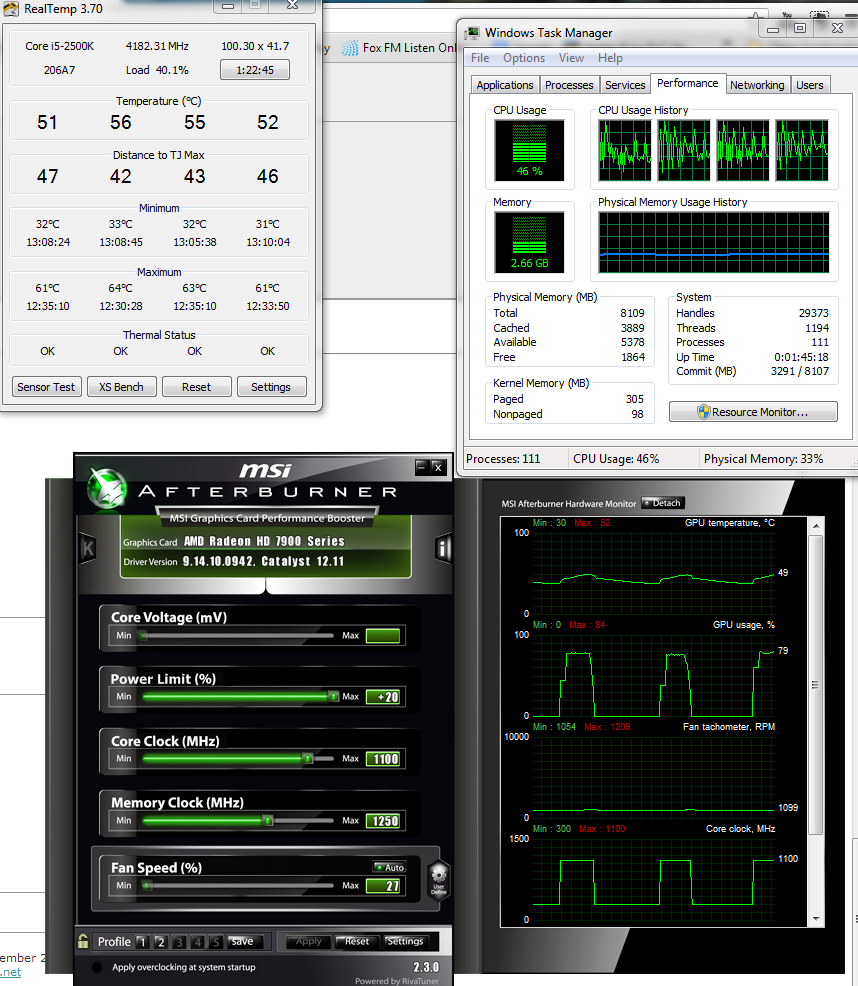 |
||
|
|
Former Member
Cruncher Joined: May 22, 2018 Post Count: 0 Status: Offline |
My GPU seems to spend as much time at idle as processing . Is there a way to make it run continuously at 100%? I did write a more detailed post with an image of my GPU behaviour but for some reason it needs to be moderated??
|
||
|
|
|