| Index | Recent Threads | Unanswered Threads | Who's Active | Guidelines | Search |
 |
World Community Grid Forums

 Category: Support

 Forum: BOINC Agent Support
 Thread: Ridiculous - can't get this program to do anything
 |
| No member browsing this thread |
|
Thread Status: Active Total posts in this thread: 5
|

|
| Author |
|


|
Former Member
Cruncher Joined: May 22, 2018 Post Count: 0 Status: Offline |
Geez, I have NO IDEA why they've stopped supporting the United Devices client. First off, the UD client is 100x simpler than this BOINC nonsense. With the UD client, it's trivial to just connect your World Community Grid account, have it run as a screensaver, and you're done. With BOINC, you have to mess with all these schedules and preferences and nonsense. UGGGHH! This program is NOT user friendly. I'm an experienced user - if I'm having problems, I can't IMAGINE what a newbie is going through trying to install this junk.
I would like to get this BOINC client to connect to world community grid. I've tried several times to connect to my account but I'm getting errors. I head to the messages tab and get a bunch of cryptic nonsense. I'm begging you guys, PLEASE start using the UD client again... this BOINC program is the worst program I've ever used. |
||
|


|
Former Member
Cruncher Joined: May 22, 2018 Post Count: 0 Status: Offline |
Update: I connected my WCG account, but I can't figure out how to set this thing to run as a screensaver only. Look at this nonsense in "Preferences":
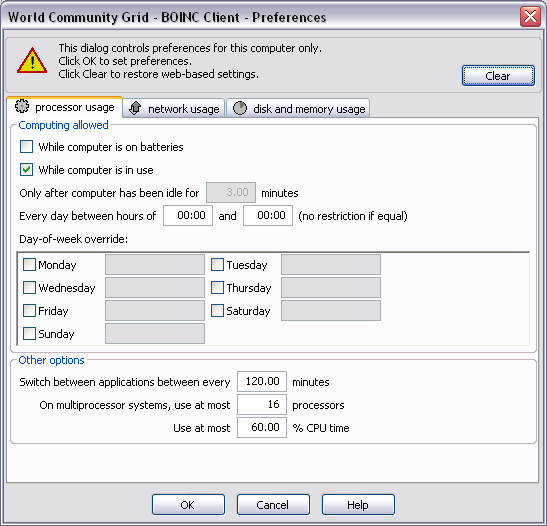 Jeez! Why does this have to be like brain surgery. There should be a simple option that says "RUN ONLY AS SCREENSAVER", and then I go to my control panel and set the screensaver to go off after X number of minutes and then DONE. That's it. Instead, it's a confusing web of options. Run on batteries? Run on Mondays? Run while I'm in the john? You either gotta use this or use the severely gimped down "Simple" view that has no functionality. UGHH! Someone PLEASE show me how to get this to run as screensaver only. |
||
|
|
Sekerob
Ace Cruncher Joined: Jul 24, 2005 Post Count: 20043 Status: Offline |
Hi and welcome and relax and take a decaf.
----------------------------------------It's when the 'too smart' start doing things rather than taking in the straight out of the box WCG download experience, choose the UD uninstall option, let it whir a bit, say yes to screensaver as the installer progresses and all should have been honky dory. Now that things are slightly confused, hit the clear button in the window you found to remove all local alterations. Next, go to the WCG My Grid > Device Manager > Device Profile > Default and choose one of the 4 preset options. "Minimal Impact" is when you really only want to crunch without you barely knowing. If you save that and choose after the Custom profile, find the box where it says to only crunch if the computer is X minutes idle. Set that to whatever delay you like. Here a FAQ on the website profile options. Next, open the Windows Display Control Panel, Screensaver and choose the BOINC or WCG screensaver. If you have found it, there is even a blanker option, so it does not burn your screen when too long on your display. Here, also set the screensaver kick-in time 1 minute longer as per the previous paragraph. That should be more or less it and now you have a choice of 5 WCG projects instead of just the 2 for the UD agent (the maker is gone and with that all support went south, well there was no support in reality). [edit: admit it, the 'too smart' are the ones that don't work thru the manual and fire things up even without perusing the Quick Start section]
WCG
----------------------------------------Please help to make the Forums an enjoyable experience for All! [Edit 1 times, last edit by Sekerob at Mar 26, 2008 10:51:37 AM] |
||
|
|
Former Member
Cruncher Joined: May 22, 2018 Post Count: 0 Status: Offline |
I take your point Skererob about the "too smart" appraoch.
I also take offence at it at the same time. See my thread on my unsatisfactory install experience. I got the email telling me to upgrade, logged on to the "my grid" page, clicked the "get software" link, and followed the instruction on this page: https://secure.worldcommunitygrid.org/reg/ms/...dBoinc.do?newMember=false Everything appeared to work, but nothing did. So was I being too smart? Or were the instructions and communications process flawed? I can appreciate how complex things can get when you have different parties involved in doing different bits of the big picture. I would suggest in this case there needs to be more attention spent on the end-user experience. :) |
||
|
|
knreed
Former World Community Grid Tech Joined: Nov 8, 2004 Post Count: 4504 Status: Offline Project Badges: 


|
chaironome,
BOINC took a different design then UD in regards to how to set it to run only when you are not actively using your computer. The only way that you could set UD to run while you were not actively using your computer was to set the screen saver only mode. BOINC took a different approach. Instead of setting a 'screen saver mode', you tell BOINC that you want it to run X minutes after you last used your computer. This has the same effect except that it does not require you to run the screen saver. You can set this option in the simple view (your screen print above shows you in the advanced view). You can return to the simple view by selecting View-> Simple View from the menu bar. Once in the simple view select 'Preferences'. This opens a window that looks like: 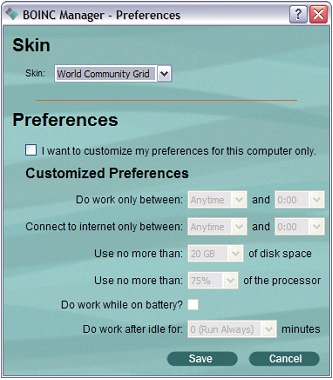 You want the option at the bottom labeled 'Do work after idle for X minutes'. Set X to be something like 5 minutes and the software will not run until 5 minutes after the last time you used the keyboard or mouse. Click save and the setting will take effect immediately. Let us know if this causes you any problems. |
||
|
|
|