| Index | Recent Threads | Unanswered Threads | Who's Active | Guidelines | Search |
 |
World Community Grid Forums

 Category: Support

 Forum: BOINC Agent Support
 Thread: "Your settings do not allow fetching tasks for NVIDIA GPU"
 |
| No member browsing this thread |
|
Thread Status: Active Total posts in this thread: 4
|

|
| Author |
|


|
nei1
Cruncher United States Joined: Jan 30, 2014 Post Count: 38 Status: Offline Project Badges: 


|
In my Windows client Notices tab, I've been getting this message continuously for the last half a year or so
----------------------------------------Your settings do not allow fetching tasks for NVIDIA GPU. To fix this, you can change Project Preferences on the project's web site. When they say "project's website," I assume they mean the WCG website. (I shouldn't have to assume.) I assume the DON'T mean I would need to go to each individual project's website, such as MCM, PandemicsRUs, etc. Their instruction, "To fix this..." is not working for me. Maybe because I'm only two years old. Can someone with patience please provide a more complete procedure, such as where to find this setting, such as Step 1. Go to... > Step 2. Go to... I've looked all around the [Windows] client, and my account settings on the WCG website, and I don't see anything about GPU settings. I think I saw something about GPU settings many years ago, but I'm not seeing them anywhere now. The object for me is to get rid of that error message being up there continuously. I'm running the Windows client on a beat up old laptop. The device manager says NVIDIA GeForce GT 330M. It's a good bet 330M isn't going to be crunching any work units. Thanks ahead, -nei1- [Edit 2 times, last edit by nei1 at Aug 5, 2021 3:33:32 PM] |
||
|


|
Falconet
Master Cruncher Portugal Joined: Mar 9, 2009 Post Count: 3315 Status: Offline Project Badges: 


|
Go to this link - https://www.worldcommunitygrid.org/ms/device/viewDevices.do
----------------------------------------Find the computer you wish to change settings for and click on the profile (probably named "Default"). Scroll down a bit till you find "Graphics Card Usage". Use my AMD/ATI graphics card if possible: Use my Intel graphics card if possible: Use my NVIDIA graphics card if possible: Choose yes to all 3, scroll down and hit save. As for your GPU, it probably won't work since the GPU app requires OpenCL 1.2 while your GPU only supports OpenCL 1.1. Even if it does work, it will be very, very slow.  - AMD Ryzen 5 1600AF 6C/12T 3.2 GHz - 85W - AMD Ryzen 5 2500U 4C/8T 2.0 GHz - 28W - AMD Ryzen 7 7730U 8C/16T 3.0 GHz |
||
|
|
nei1
Cruncher United States Joined: Jan 30, 2014 Post Count: 38 Status: Offline Project Badges:
|
> click on the profile (probably named "Default")
Yes, mine is set to Default > Scroll down a bit till you find "Graphics Card Usage". Nope; I don't see it. 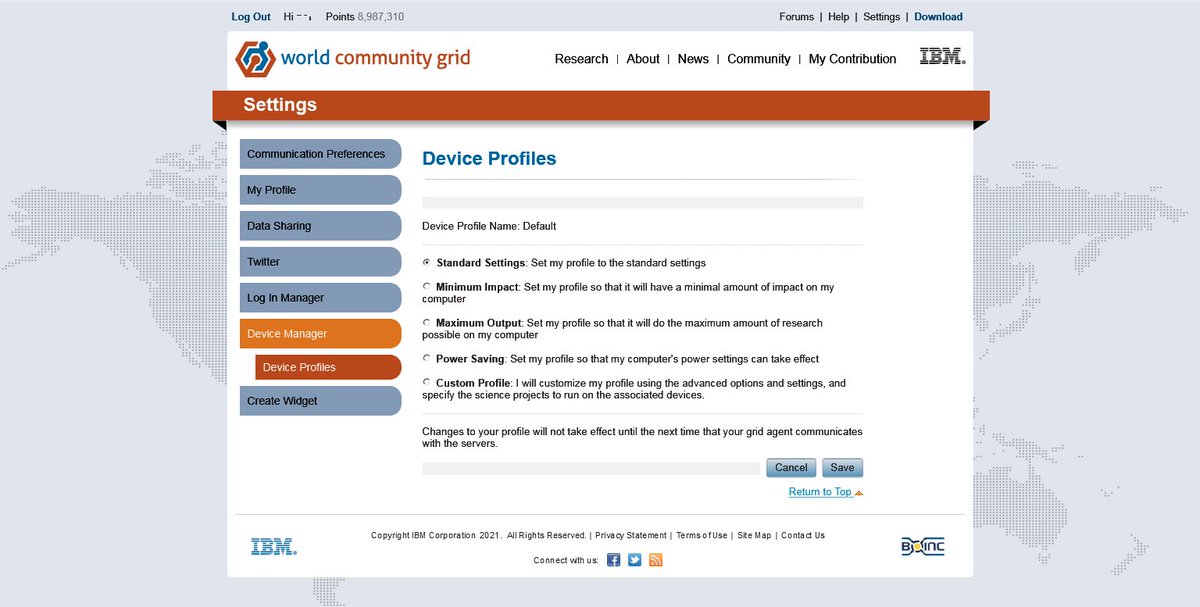 The page, the whole page and nothing but the page. Nothing about graphic card settings. The page, the whole page and nothing but the page. Nothing about graphic card settings.Well, I followed the directions, but I''m not getting the options you say I'm supposed to be getting. My account must be corrupted. Thanks anyway. |
||
|
|
BladeD
Ace Cruncher USA Joined: Nov 17, 2004 Post Count: 28976 Status: Offline Project Badges: 


|
Try clicking on Custom Profile.
-------------------------------------------------------------------------------- [Edit 1 times, last edit by BladeD at Aug 6, 2021 10:50:37 AM] |
||
|


|
|