| Index | Recent Threads | Unanswered Threads | Who's Active | Guidelines | Search |
 |
World Community Grid Forums

 Category: Support

 Forum: GPU Support Forum
 Thread: Please Post if GPU Board is GOOD and works WELL with Windows
 |
| No member browsing this thread |
|
Thread Status: Active Total posts in this thread: 30
|

|
| Author |
|


|
Coleslaw
Veteran Cruncher USA Joined: Mar 29, 2007 Post Count: 1343 Status: Offline Project Badges: 


|
stewjack, this is limited from motherboard to motherboard. More and more are allowing this where as many older boards did not support it. If your board does allow it, then yes it can be awesome for basic use on the onboard and let BOINC have full access to the GPU. I had a dual core e-Machines that did this fine until I started swapping cards in and out. Now, it doesn't work right. I'm OK with that because it is a HTPC which runs all the time anyways.
----------------------------------------For those claiming no problems with other projects like Einstein, SETI, and POEM... this experience is different depending on the cards. To this day I still see drivers crash on SETI, Einstein, and GPUGrid depending on the card and system. However, I have little trouble from any card I have tried both low end and high from projects like PrimeGrid, Collatz, and Moo!. I think finding what is right for your setup here should not be compared to other projects in this case. They are different science apps altogether and have different needs and coding. Some systems I have monitored needed Aero disabled for peek performance and some didn't with the same card but different other components. Some needed freed up cores/threads and some didn't to smooth operation. I have noticed much better results by not running any screen saver. If screen saver is needed, use the standard Windows (or your OS choice defaults) rather then the BOINC screen savers. Do not suspend your screen but rather lift your arm and turn the monitor off to save power. Change you power saving options to not scale down the graphics while idle. Close web browsers when not in use because sometimes Flash ads can cause havoc. Some browsers use hardware acceleration which fight for resources. These are just a few things to experiment with to see what works for you.     |
||
|


|
Former Member
Cruncher Joined: May 22, 2018 Post Count: 0 Status: Offline |
They are different science apps altogether and have different needs and coding. Right on the money!  Exactly why I wanted the WCG-Techs to please chime in and please shed some light on the nature of the issues/problems behind the symptoms (the most popular of which symptoms seems to be the video-lag thing). Without an understanding of the nature of any issue for that matter, the solution, or should I say, the work-around -- may well be a shot in the dark. Lucky are those who have workarounds that happen to also solve the issue at the core. Ah, yes, before I forget, perhaps the most common workaround, easily very convenient and very effective in dismissing the video-lag -- is to stop crunching WCG's HCC-GPU-v6.56! Now never mind if that is more like eliminating the issue rather than solving it, but hey, it works!  ; |
||
|
|
Dieter Matuschek
Advanced Cruncher Germany Joined: Aug 13, 2005 Post Count: 142 Status: Offline Project Badges: 


|
/off topic/
----------------------------------------Quote from mikey159b: There is a way you can set Boinc to notice that you are playing a dvd and stop crunching if you'd like, then when the dvd is done Boinc will automatically start right back up again. This information is very valuable for me. I've just made the suitable settings. Now there are no problems any more.Thank you very much!!  /on topic/  Ask not what the world can do for you - ask what you can do for the world. |
||
|
|
RAID Xero
Cruncher Joined: Mar 17, 2006 Post Count: 22 Status: Offline Project Badges: 


|
Video Card: Gforce GTX 260 Core 216 (EVGA)
CPU: Intel Core i7 2600k @4.0 GHz CPU HS/Fan: Coolermaster Hyper 212+ MB: Gigabyte Z68X-UD3H-B3 RAM: Kingston 4 GBx2 DDR3-1600 PSU: Seasonic 550 SII Everything runs great. Stays cool and no problems with GPU crunching. |
||
|
|
mmstick
Senior Cruncher Joined: Aug 19, 2010 Post Count: 151 Status: Offline Project Badges: 


|
Just a simple Radeon HD 7950 with a FX-8120. Not even the slightest hint of lag while watching 1080p High10 10-bit x264 videos.
|
||
|
|
BladeD
Ace Cruncher USA Joined: Nov 17, 2004 Post Count: 28976 Status: Offline Project Badges:


|
One thing on Win7 that can help the lag is to disable Aero if you're using it. Atleast at Folding@home they're always recommending users to turn-on Aero, since for some reason or other this gives better performance... Also, for anyone "waiting on WCG to fix the lagging", after over 6 years with GPU-crunching Folding@home still gives lagging, so in my opinion it's unrealistic to get anything except "work-arounds". I'm running a HD7870 now. But when I had a 5870CF, I had no lag except with video. Normally if I pause GPU and start the video, then I could un-pause GPU and watch the video (including Blu-ray) without lag. I sometime see a small lag watching 1080p videos which I fix by pausing the video and un-pausing it. I don't want to pause the GPU now with x number of WUs running at a time in sync (ie. started @30secs apart). |
||
|


|
[AF>HFR]Thomas
Cruncher Joined: Apr 7, 2006 Post Count: 2 Status: Offline Project Badges:


|
Radeon 7870 (Sapphire DoubleFan edition) is doing great, I can still watch HD movies, or HD videos in Youtube while it'l computing.
And as it seems that Boinc only runs one Computation on the GPU at once, the temps stays almost as low as if the GPU was idle. |
||
|
|
Former Member
Cruncher Joined: May 22, 2018 Post Count: 0 Status: Offline |
Well, i thought i'd try with my card, is it ok ?
----------------------------------------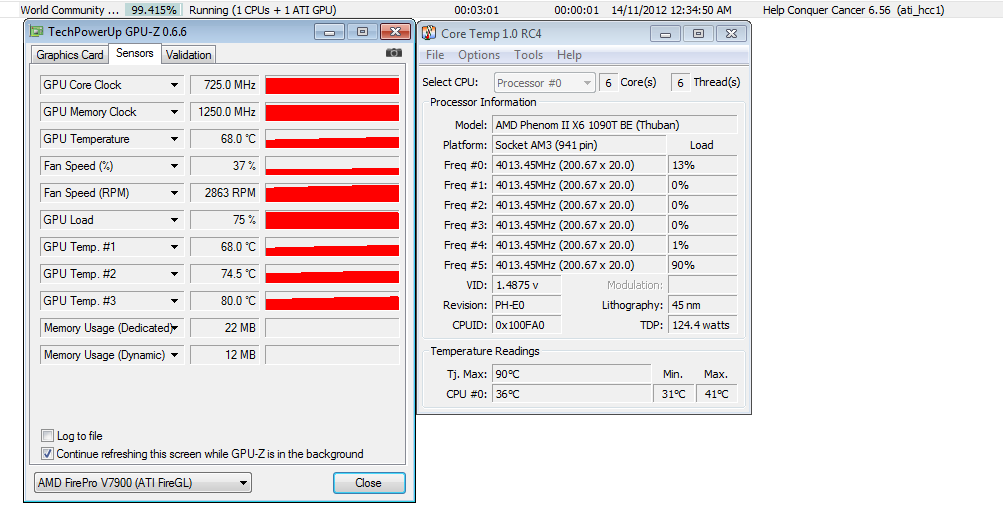 It was 100% complete after 4:01min. How can i calculate which is GPU and which CPU time ? [Edit 1 times, last edit by Former Member at Nov 6, 2012 10:53:55 PM] |
||
|
|
Bearcat
Master Cruncher USA Joined: Jan 6, 2007 Post Count: 2803 Status: Offline Project Badges:


|
As long as it doesn't lock up your system or over heat, looks good. Looking at the load, you could probably do 2. Just watch for issues.
----------------------------------------
Crunching for humanity since 2007!
 |
||
|
|
nanoprobe
Master Cruncher Classified Joined: Aug 29, 2008 Post Count: 2998 Status: Offline Project Badges: 


|
@ felix w
----------------------------------------Download and install a program called MSI Afterburner. Use it to down clock your GPU memory clock. Running it at 1200MHz. wastes power and produces extra heat. You don't need the GPU memory clock that high to run these tasks. Try lowering it 200MHz at a time and let it run for a stability check. Your final target should be 600 Mhz.
In 1969 I took an oath to defend and protect the U S Constitution against all enemies, both foreign and Domestic. There was no expiration date.
  |
||
|
|
|