| Index | Recent Threads | Unanswered Threads | Who's Active | Guidelines | Search |
 |
World Community Grid Forums

 Category: Support

 Forum: BOINC Agent Support
 Thread: [RESOLVED] BOINC : No way to change group for user [Resolved]
 |
| No member browsing this thread |
|
Thread Status: Active Total posts in this thread: 15
|

|
| Author |
|


|
Former Member
Cruncher Joined: May 22, 2018 Post Count: 0 Status: Offline |
Hello !
----------------------------------------I moved to the new 6.2.28 release, and installed it on my new PC equipped with the Windows Vista Home Premium OS. I kept all boxes checked to enable agent on all users on the PC, but apart for administrator login, whenever I log under an other user, the agent and the manager both starts, but no way to connect. I just have a message requested me to add the user to the "boinc_user" group... But, it seems, there's no way to do it under Vista Premium... As anyone another solution to work this problem around ? Thanks in advance, L. [Edit 2 times, last edit by Former Member at May 29, 2009 2:56:57 PM] |
||
|


|
Sekerob
Ace Cruncher Joined: Jul 24, 2005 Post Count: 20043 Status: Offline |
Suggest an uninstall, reinstall of BOINC. Of course you need to tell the security software that the components of BOINC can talk to each other. Usually though the security software will automatically ask for you to give that permission. Ports 80, 443, 31416 and IP 127.0.0.1 (localhost) are used by BOINC to communicate.
----------------------------------------
WCG
Please help to make the Forums an enjoyable experience for All! |
||
|
|
Former Member
Cruncher Joined: May 22, 2018 Post Count: 0 Status: Offline |
I did this yesterday evening, but with no success...
When I log into my user account, the BOINC manager tries to connect but fails. I've got an error message saying 'add your current user to the boinc_users group'. But it does not seem possible under Vista... Do I have to perform the re-installation under the administrative account for this to work ? |
||
|
|
Sekerob
Ace Cruncher Joined: Jul 24, 2005 Post Count: 20043 Status: Offline |
Yes, the install has to be done under a privileged account, else the permissions could not be set.
----------------------------------------edit: and to reassure, Vista HP runs BOINC 6.2.28 perfectly fine, both as service only and as service+all user.
WCG
----------------------------------------Please help to make the Forums an enjoyable experience for All! [Edit 1 times, last edit by Sekerob at May 28, 2009 8:20:49 AM] |
||
|
|
Former Member
Cruncher Joined: May 22, 2018 Post Count: 0 Status: Offline |
...I got it running on 3 Vista machines....no problem
|
||
|
|
Former Member
Cruncher Joined: May 22, 2018 Post Count: 0 Status: Offline |
OK... Thanks for the information...
I'll retry this evening, installing a-new the BOINC... I'll keep you informed. Many thanks. |
||
|
|
Former Member
Cruncher Joined: May 22, 2018 Post Count: 0 Status: Offline |
Hi, zePit.
When you install, you must select the option "Allow all users on this computer to manage the World Community Grid - BOINC software" if you are installing using a different account to the one you normally use. 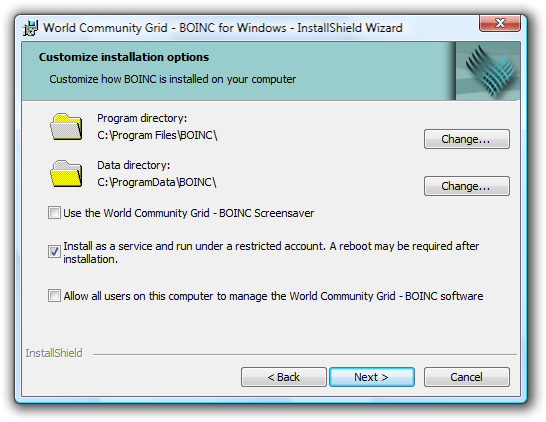 http://wcg.wikia.com/wiki/Installation_(Vista) |
||
|
|
Ingleside
Veteran Cruncher Norway Joined: Nov 19, 2005 Post Count: 974 Status: Offline Project Badges: 


|
Hello ! I moved to the new 6.2.28 release, and installed it on my new PC equipped with the Windows Vista Home Premium OS. I kept all boxes checked to enable agent on all users on the PC, but apart for administrator login, whenever I log under an other user, the agent and the manager both starts, but no way to connect. I just have a message requested me to add the user to the "boinc_user" group... But, it seems, there's no way to do it under Vista Premium... As anyone another solution to work this problem around ? Thanks in advance, L. Did you select "Allow all users of computer to manage the WCG - BOINC software?", as shown in Didactylos screen-shot? If it's not working with "Allow all..." selected, chances are you've hit the multi-user-install-bug. This bug should be fixed in the current BOINC-client v6.6.28, so you can try installing this version instead of the old WCG-version.  "I make so many mistakes. But then just think of all the mistakes I don't make, although I might." |
||
|
|
Former Member
Cruncher Joined: May 22, 2018 Post Count: 0 Status: Offline |
We do not recommend BOINC 6.6.
|
||
|
|
Former Member
Cruncher Joined: May 22, 2018 Post Count: 0 Status: Offline |
I'll first try re-installing as administrator...
Then, concerning the following: Ingleside said: This bug should be fixed in the current BOINC-client v6.6.28, so you can try installing this version instead of the old WCG-version. Didactylos said: We do not recommend BOINC 6.6. Which one is the good one  ? ?I assume release 6.6.28 is a beta release, or a unofficial release ? L. |
||
|
|
|