Page 1 of 1
Configure in Joomla 3
Posted: 19 Dec 2014, 15:14
by Moretti
HI!
Could someone help me configure the gallery phoca in Joomla3
equal to the example of
https://www.phoca.cz/demo/gallery-categories-detail link?
I'm a little confused ...
Re: Configure in Joomla 3
Posted: 19 Dec 2014, 17:20
by Benno
Hi,
backend --> Components --> Phoca Gallery --> Control Panel --> Options --> Categories View --> Categories View - Legacy Settings
(Because the link you posted, is a Phoca Gallery v2 view)
Kind regards,
Benno
Re: Configure in Joomla 3
Posted: 19 Dec 2014, 18:08
by Moretti
Hi Benno!
You would have some sample configuration for me
which is equal to the link I posted?
Re: Configure in Joomla 3
Posted: 19 Dec 2014, 18:33
by Benno
Hi,
You would have some sample configuration for me
which is equal to the link I posted?
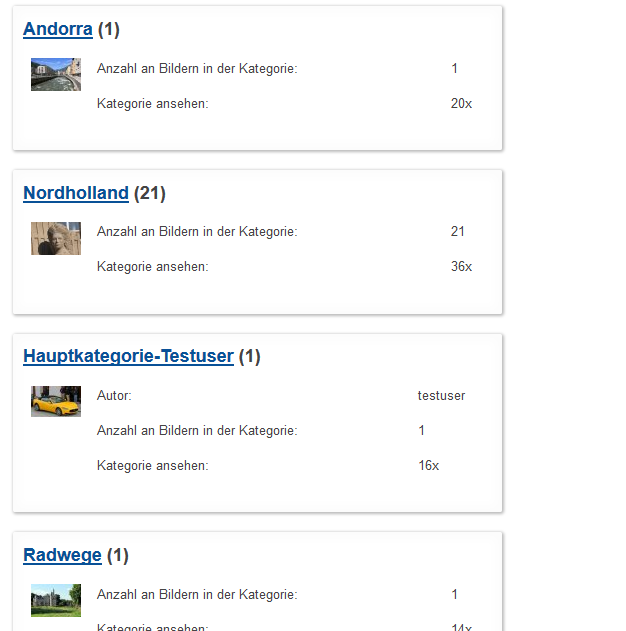
It is not exactly like that, but it's pretty similar:
backend --> Components --> Phoca Gallery --> Control Panel --> Options --> Categories View --> Categories View - Legacy Settings -->
Displaying Style=Categories, images and detail information (float)
Equal Percentage Column Width=Yes
Box Width=70%
Number Of Columns=1
Save & Close
See:
Kind regards,
Benno
Re: Configure in Joomla 3
Posted: 19 Dec 2014, 19:44
by Moretti
tks!
How I can enable again the link "Galleries" in front end?
Re: Configure in Joomla 3
Posted: 19 Dec 2014, 19:46
by Benno
Hi,
How I can enable again the link "Galleries" in front end?
Sorry, I don't understand. Do you mean the menu link?
Kind regards,
Benno
Re: Configure in Joomla 3
Posted: 19 Dec 2014, 20:04
by Moretti
Please see my website
http://www.mitranh.org.br
Menu on the left "GALERIA DE FOTOS"
Does not show categories ...
Re: Configure in Joomla 3
Posted: 19 Dec 2014, 20:22
by Benno
Hi,
you need to have a Phoca Gallery menu link "List of Categories (Categories View)" if you want to use 'Galleries' of Phoca Gallery Tree Module.
This link can be hidden if you don't want to display it on your site.
Seek this forum for 'Hidden Menu'.
Kind regards,
Benno
Re: Configure in Joomla 3
Posted: 19 Dec 2014, 20:37
by Moretti
Now it's all ok,
thank you.
Merry Christmas and Happy New Year.
Re: Configure in Joomla 3
Posted: 19 Dec 2014, 20:46
by Benno
You're welcome!
Merry Christmas and Happy New Year.
For you the same!!!
Kind regards,
Benno