Page 1 of 1
Change Image Size
Posted: 05 May 2011, 17:36
by Master1791
Hi,
I have set up my first Joomla (version 1.6) site yesterday and installed Phoca (version 3.0.0 RC5) as Gallery extension. The Server is a Windows Server 2008 R2 machine.
What I currently don't like about the gallery is the small image which opens up when i click on the thumbnail. Is it possibe to change the size of the full image view? I have read allot in the internet and did't find anything which I was able to apply on my webpage. What is the easiest or best way to do it?
Thanks for your help.
Mathias
Re: Change Image Size
Posted: 06 May 2011, 12:39
by Benno
Hi,
Is it possibe to change the size of the full image view?
Yes!
backend --> Components --> Phoca Gallery --> Control Panel --> Options --> Main --> Images And Detail Window Size Settings -->
Large Image Width=(as you like)
Large Image Height=(as you like)
Save & Close
Delete the wrong sized thumbs e.g. with FTP and create them with new settings once more.
Kind regards,
Benno
Re: Change Image Size
Posted: 11 May 2011, 11:57
by Master1791
Thx for your reply! I just took a look and I always missed the options button on the top

Re: Change Image Size
Posted: 11 May 2011, 15:58
by Benno
Ok.
Kind regards,
Benno
Re: Change Image Size
Posted: 28 Mar 2017, 12:53
by cousinjay
I have the same issue. I know this thread is old, so I guess the options button is somewhere else. I have been looking, but I don't see it anywhere.
I have looked at all of the options in the side bar and see nothing helpful.
Thanks.
Re: Change Image Size
Posted: 28 Mar 2017, 14:23
by Benno
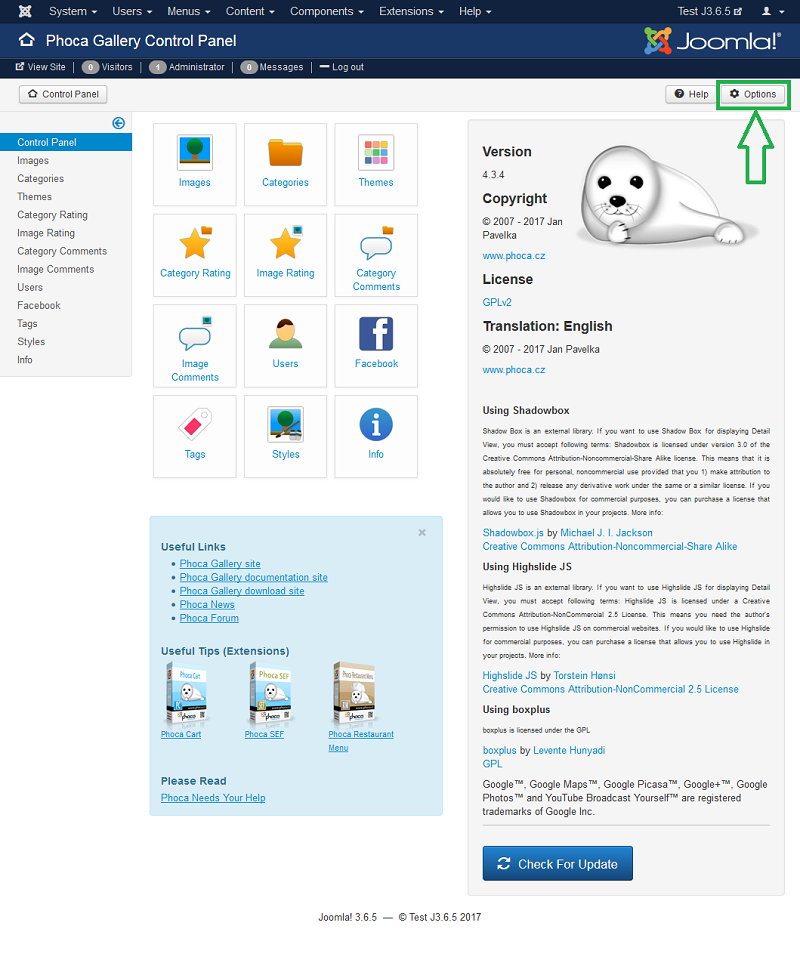
Kind regards,
Benno
Re: Change Image Size
Posted: 28 Mar 2017, 17:17
by cousinjay
So I found the options button and now have discovered all kinds of way to get myself in trouble. Obviously I've changed a setting but I don't know which one, or what it should be.
Thanks if you can help.
http://www.siegelreunion.com/index.php/ ... 10-reunion
Re: Change Image Size
Posted: 28 Mar 2017, 19:26
by Benno
Hi,
I'm not quite sure, but I suspect that you have changed the Detail View at last. It would have to fit again, if you switch the Detail View e.g. to Highslide JS (Image Only), or if you set:
backend --> Components --> Phoca Gallery --> Control Panel --> Options --> General Settings --> Responsive Design=Yes
And you should enlarge the box height:
backend --> Components --> Phoca Gallery --> Control Panel --> Options --> Category View --> Image Box Space=15(Try out Values)
Kind regards,
Benno