| Index | Recent Threads | Unanswered Threads | Who's Active | Guidelines | Search |
 |
World Community Grid Forums

 Category: Community

 Forum: Hardware Chat Room
 Thread: Laptop 24/7, wear and tear!
 |
| No member browsing this thread |
|
Thread Status: Active Total posts in this thread: 22
|

|
| Author |
|


|
Former Member
Cruncher Joined: May 22, 2018 Post Count: 0 Status: Offline |
Hey everyone, I'm new to the forums here and just wanted to ask a quick question. Who here runs World Community Grid or any other BOINC project on a laptop 24/7? and if you do what settings you use and what temp you get? Also have you had any issues with hardware or with your laptop suddenly kicking the bucket?
In the old days I mostly used desktop setups with custom cooling so never had any issues. For the first time my main computer at the moment is a Asus ROG G750JS, and I been running WCD on it for few days straight now with temp going around 60-70c. It's probably safe for now but just trying to think long term a year or so from now should I be worried? I want this computer to last another 3 years or so at least. Cheers!  |
||
|


|
flynryan
Senior Cruncher United States Joined: Aug 15, 2006 Post Count: 235 Status: Offline Project Badges: 


|
I crunched for a few years 24/7 on a laptop once, and the hardware was fine. It was the battery that could no longer hold a charge for more then a few minutes because heat kills batteries over time. 60-70 C is quite ok for a laptop if it is running full throttle.
Don't forget to clean out the cooling fins with compressed air or a vacuum cleaner once in a while, or if you are technical enough take apart the laptop and clean it inside out. |
||
|
|
Byteball_730a2960
Senior Cruncher Joined: Oct 29, 2010 Post Count: 318 Status: Offline Project Badges:


|
I've been running a 4core/8 thread toshiba laptop (i7-3610QM) pretty much 24/7 for the last 3 years with about 22 years of runtime on it.
See the attached picture from CPUID HW monitor, for the current stats. Please note that the core temp highs are when the computer is flat on the table. The lows are when I have lifted the back of it, to give better airflow The battery has worn down over the years, by 22%, but I don't know how much different this is to normal wear and tear. 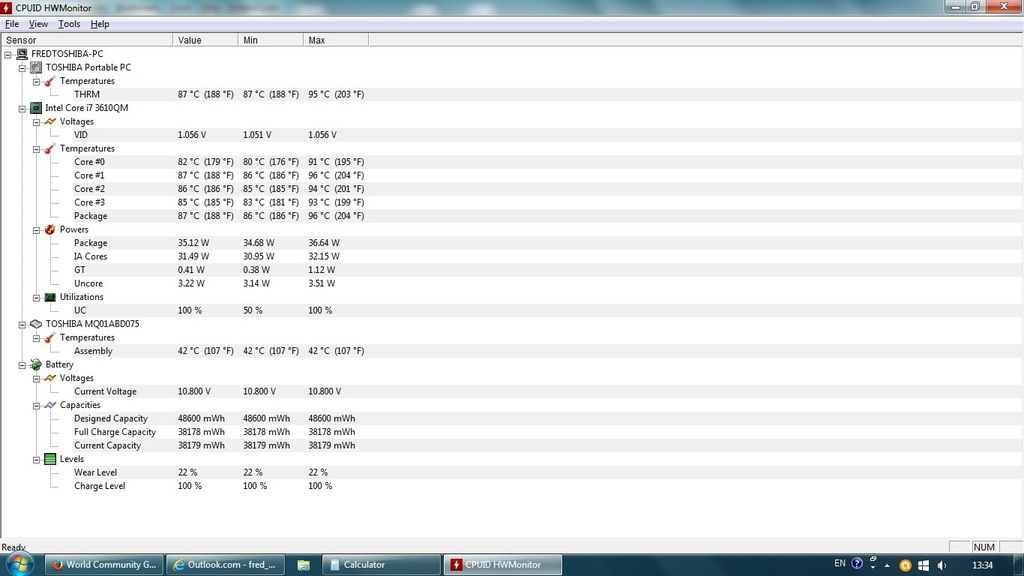 |
||
|
|
KLiK
Master Cruncher Croatia Joined: Nov 13, 2006 Post Count: 3108 Status: Offline Project Badges: 


|
absolutely MUST HAVE 4 a laptop is program like TThrottle, link here: http://efmer.com/b/
----------------------------------------so, install it & select d max temp that u r comfortable with...& put BOINC on 100% of CPU time...TThrottle will do d rest of it!  btw, I'm running on several different laptops...Toshiba, IBM/Lenovo, Dell & Fujitsu/Siemens can run about 80-85% of Tjunc... HP & Compaq should be run a little slower, 70-80% of Tjunc... that is my experience! |
||
|


|
Former Member
Cruncher Joined: May 22, 2018 Post Count: 0 Status: Offline |
I've been running a 4core/8 thread toshiba laptop (i7-3610QM) pretty much 24/7 for the last 3 years with about 22 years of runtime on it. See the attached picture from CPUID HW monitor, for the current stats. Please note that the core temp highs are when the computer is flat on the table. The lows are when I have lifted the back of it, to give better airflow The battery has worn down over the years, by 22%, but I don't know how much different this is to normal wear and tear. Wow that temp seems really hot, I thought 95c was the cut off when computer shuts down usually? So overall good quality laptop considering its been running 24/7 for 3 years. Heavy usage will bring out all the faults in the hardware very quickly, so if it didn't brake within a year or so should be sweet for ages. Battery I think either dies completely or drops 50% capacity after about 5 years. So 22% after 3 years sounds about right. absolutely MUST HAVE 4 a laptop is program like TThrottle, link here: http://efmer.com/b/ so, install it & select d max temp that u r comfortable with...& put BOINC on 100% of CPU time...TThrottle will do d rest of it! btw, I'm running on several different laptops...Toshiba, IBM/Lenovo, Dell & Fujitsu/Siemens can run about 80-85% of Tjunc... HP & Compaq should be run a little slower, 70-80% of Tjunc... that is my experience! Yea I was told about TThrottle not long ago I just installed and having a play with it, it sounds like a must have software. Should be part of the operating system in my opinion :) [Edit 1 times, last edit by Former Member at Sep 2, 2015 6:08:11 AM] |
||
|
|
Byteball_730a2960
Senior Cruncher Joined: Oct 29, 2010 Post Count: 318 Status: Offline Project Badges:
|
Thanks Dmitri.
Yeah, I have had no issues with this laptop at all and it moves around a lot but it is still going strong. I did some research and found that people rated Toshiba for it's build quality and so far so go, apart from 2 USB ports failing. I do clean out the ports and the fan regularly so this helps a lot. Tjunction is 105celcius, so it is running at about 90% of that. |
||
|
|
Former Member
Cruncher Joined: May 22, 2018 Post Count: 0 Status: Offline |
Dimitri, if you wish to loose 75% percent of your crunching capacity on a 8 hyper-threaded device than TThrottle is a must
. You need to understand thoroughly, that if the crunching is reduced to 50%, the cycles of the virtually split cores merge with the 4 physical core threads, i.e. at 50% the CPU is practically still running near 100%, barely no reduction in temperature. Only when you go beyond 50% reduction will there be effective lower temps. It's reason why I since have banned the tool on hyper-threaded systems and use alternates such as ThreadMasterGUI [microsecond, science app level control], or simple, reduce the cycles with the 'Processor power management' (PPM) as I've done in the past 3 months, running 1.6-1.8Ghz instead of 2.5 on the I7-2670QM (and the heat continues). The trick of this and TMG is, you still count full computing time for WCG, with slowing down using the BOINC or other active throttles you're just introducing saw-tooth computing and that I don't see as long term sustainable by hardware, particular the rev-up and rev-down of the fans. Cost me already one fan replacement, no sinecure on a laptop. So my recommendation is, reduce the cycles through the PPM. Other advantage is, the turbo kick still works i.e. when you use the laptop and you need more computing power, you'll get it. |
||
|
|
Former Member
Cruncher Joined: May 22, 2018 Post Count: 0 Status: Offline |
Is this what you mean by reduce the cycles with the 'Processor power management' (PPM) ?
---------------------------------------- Even just dropping it 1% from 100 to 99, according to "Open Hardware Monitor" the CPU speed is now 2.4ghz instead of the 3.4ghz, so I am guessing this is because the turbo mode got disabled? If I do this way than yea I dont need TThrottle, the temp just dropped from 75c to 58 and even the fan stopped lol. BOINC is set @ 100% [Edit 1 times, last edit by Former Member at Sep 2, 2015 8:52:14 AM] |
||
|
|
Former Member
Cruncher Joined: May 22, 2018 Post Count: 0 Status: Offline |
In my previous post I should have said "if you wish to loose up-to 75% percent"... the experiences vary. My duo Centrino when the TThrotlle ceiling is set at 70C, the crunching drops to 80%. But on the HT, mostly down to 25%, just to get a 10C drop.
----------------------------------------Yes, the sustained max with 100% is no longer the 99% setting [T 'normal' speed at which the CPU is advertised is only run when at 100%], but the Turbo boost still works when needed... it remains 'ad-hoc' available, as I can see in the CoreTemp Systray monitor... it's when BOINC gets slowed, it running at lowest priority and higher priority apps need the juice. The Turbo Boost max is stepped, depending on number of cores running, so I never get more than 3.7 for instance on the I7 desktop because all are fully loaded, but if only 1 or 2, can get up to 3.9, for a little (I don't overclock CPU's). Edit: Got a Notepal 3 fan under the laptop, the cover of the RAM area removed. [Edit 1 times, last edit by Former Member at Sep 2, 2015 3:48:00 PM] |
||
|
|
Former Member
Cruncher Joined: May 22, 2018 Post Count: 0 Status: Offline |
I have an older (2008ish) Acer laptop with a Pentium D running Linux Mint. It is in my sons room for homework and doesn't move. I have it sitting on a laptop cooler that has slim 80mm fans that you can move to the desired location. One nice thing about that Acer, you can remove the bottom panel of the laptop which provides easy access to the hard drive, memory, and processor heat sink. I have that panel removed and one of the 80mm fans blowing directly on the processor, and it dropped my processor temp by about 25*F according to hwmonitor.
|
||
|
|
|