| Index | Recent Threads | Unanswered Threads | Who's Active | Guidelines | Search |
 |
World Community Grid Forums

 Category: Community

 Forum: Chat Room
 Thread: I've lost the WCG screensavers
 |
| No member browsing this thread |
|
Thread Status: Active Total posts in this thread: 8
|

|
| Author |
|


|
Janie Pickles
Cruncher Joined: May 6, 2006 Post Count: 13 Status: Offline Project Badges: 


|
It used to be that whenever I came to use my computer I would see various WCG artworks or diagrams on my screen, showing the process on different projects. Now I see nothing. It looks as though WCG isn't working, but when I look at my stats I see that it is.
I would very much like to get these back if possible. I am a very basic computer user (& very basic WCG member) so would much appreciate a simply-worded answer. Thank you! |
||
|


|
jonnieb-uk
Ace Cruncher England Joined: Nov 30, 2011 Post Count: 6105 Status: Offline Project Badges: 


|
Two easy steps to follow to determine the extent of the problem:
----------------------------------------1. CTRL+Alt+Del to bring up Windows Task Manager. Under the Applications tab is BOINC Manager listed as running? If not you need to restart it "START>>All Programs>>BOINC>>Boinc Manager" 2. On your computers "Control Panel" select "Appearance and Personalization" then "Change Screen Saver" On the drop down menu for Screen Savers BOINC should be an option. Select BOINC then "Preview" then "OK". 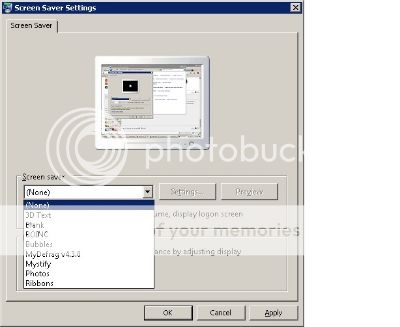 If the above doesn't resolve the problem come back and provide some more information e.g. Windows Version, BOINC Manager version etc ---------------------------------------- [Edit 1 times, last edit by jonnieb-uk at Apr 2, 2014 5:18:32 PM] |
||
|

|
Janie Pickles
Cruncher Joined: May 6, 2006 Post Count: 13 Status: Offline Project Badges:
|
Hi Jonnie,
My next door neighbour - much better with computers than me - came round and followed your advice. Regrettably Boinc was not showing as a screensaver option. So herewith some more info. I run Windows 7 on a 342 bit computer. My Boinc Manager Version is 6.10.58 My WX Widgets Version is 2.8.10 When I look last looked at what was going on with WCG on my computer it was running 2 different projects both called "Fighting AIDS" |
||
|
|
Janie Pickles
Cruncher Joined: May 6, 2006 Post Count: 13 Status: Offline Project Badges:
|
Sorry, that was obviously meant to be a 32 bit computer!
|
||
|
|
Falconet
Master Cruncher Portugal Joined: Mar 9, 2009 Post Count: 3315 Status: Offline Project Badges:


|
You could reinstall BOINC and select the option "Use as screensaver".
---------------------------------------- - AMD Ryzen 5 1600AF 6C/12T 3.2 GHz - 85W - AMD Ryzen 5 2500U 4C/8T 2.0 GHz - 28W - AMD Ryzen 7 7730U 8C/16T 3.0 GHz |
||
|
|
jonnieb-uk
Ace Cruncher England Joined: Nov 30, 2011 Post Count: 6105 Status: Offline Project Badges:
|
You could reinstall BOINC and select the option "Use as screensaver". At the same time take the opportunity to upgrade to the new WCG approved version of BOINC 7.2.47 see here ---------------------------------------- [Edit 1 times, last edit by jonnieb-uk at Apr 2, 2014 4:23:24 PM] |
||
|
|
Former Member
Cruncher Joined: May 22, 2018 Post Count: 0 Status: Offline |
The screen saver is named World Community Grid, not BOINC. To upgrade to the latest World Community Grid release of BOINC (BOINC 7.2.47 for Windows), all you need to do is click on Download at the upper right of the Forum webpage.
Lawrence |
||
|
|
Janie Pickles
Cruncher Joined: May 6, 2006 Post Count: 13 Status: Offline Project Badges:
|
Hi Falconet, Jonnie and Lawrence!
We have followed all your instructions, and everything is now running as it should be. Thank you so much for your help! I am not seeing the WCG screensaver as much as I used to, but I am now seeing it. Yaaay! I suspect the reason I am seeing it less has something to do with changing over from Windows XP to Windows 7. Thank you so much for all your help and advice! |
||
|
|
|