| Index | Recent Threads | Unanswered Threads | Who's Active | Guidelines | Search |
 |
World Community Grid Forums

 Category: Completed Research

 Forum: The Clean Energy Project - Phase 2 Forum
 Thread: CPU Time vs Elapsed Time
 |
| No member browsing this thread |
|
Thread Status: Active Total posts in this thread: 13
|

|
| Author |
|


|
Former Member
Cruncher Joined: May 22, 2018 Post Count: 0 Status: Offline |
Forgive my ignorance,
I recently changed from F@H to BOINC and do not fully understand the system. My workstation stays powered on and crunching 24/7, currently crunching all available work unit types on WCG. I've noticed that MCM and FightAids (Autodesk & Vina) have matching values for CPU Time & Elapsed time for all work units submitted, however CEP2 units show values such as 18.00/12.49, 16.30/12.36, 15.06/11.48 Any insight on the reason for the difference is appreciated |
||
|


|
Mamajuanauk
Master Cruncher United Kingdom Joined: Dec 15, 2012 Post Count: 1900 Status: Offline Project Badges: 


|
CEP2 is more CPU intensive than the others, each wu takes it in turns to have CPU cycles, even on large well resources systems.
----------------------------------------There are several things that can be done to assist
run 1 less wu than CPU threads/cores Reduce the number of CEP2 wu's running by reducing the number allowed within your profile on the WCG web site These are likely not the only things that will help, but in my smaller machines I found it helped...
Mamajuanauk is the Name! Crunching is the Game!
  |
||
|
|
PMH_UK
Veteran Cruncher UK Joined: Apr 26, 2007 Post Count: 786 Status: Offline Project Badges: 


|
Welcome to the world of WCG BOINC.
----------------------------------------CEP2 does a lot of I/O with no CPU use while it does so. Multi-core processors may make this worse with CEP2 tasks contending for disk access. Some use RAM disk or SSDs to reduce impact. Paul.
Paul.
|
||
|
|
jonnieb-uk
Ace Cruncher England Joined: Nov 30, 2011 Post Count: 6105 Status: Offline Project Badges: 


|
Reduce the number of CEP2 wu's running by reducing the number allowed within your profile on the WCG web site A small but significant correction - The number of CEP2 WUs in a profile only controls the number of tasks fetched/ available in your queue to be worked on. It's worth noting that any selection other than the default value of "1" avoids the possibility of "bandwidth" problems. To restrict the number of CEP2 WUs which can run concurrently you need to create/amend the app_config file. (Found in C:\ProgramData\BOINC\projects\www.worldcommunitygrid.org\ in standard Windows installation). <app_config> <app> <name>cep2</name> <max_concurrent>xx </max_concurrent> </app> </app_config> xx Insert number according to personal preference/experience. Trial and error may be necessary. Having created/amended the app_config file don't for get to "Read local prefs file" in BOINC Mgr. You must be running BOINC 7.0.65 or later. |
||
|

|
Former Member
Cruncher Joined: May 22, 2018 Post Count: 0 Status: Offline |
CEP2 does a lot of I/O with no CPU use while it does so. Multi-core processors may make this worse with CEP2 tasks contending for disk access. Some use RAM disk or SSDs to reduce impact. This makes some sense, considering the workstation is typically used as a file server, while running a number of WCG projects. The OS (and BOINC) is installed on a 120GB SSD, with the File Repository being a 7TB (8x1TB Disk) RAID5 array. The file server CPU overhead is very low, 1xCore dedicated Ensure plenty of RAM in the system - CEP2 likes ram run 1 less wu than CPU threads/cores Reduce the number of CEP2 wu's running by reducing the number allowed within your profile on the WCG web site RAM isn't an issue, currently using only 4.6 out of 64GB and there is no Swap allocated, since it has never come close to using it all. Currently running 31 out of 32 cores. At most I've had 3xCEP2 projects running out of 31, but if it is very IO intensive, this may cause the issue. Thanks for the quick replies. |
||
|
|
Former Member
Cruncher Joined: May 22, 2018 Post Count: 0 Status: Offline |
@Mamajuanauk, @PMH_UK
You were correct, running BOINC from a Ramdrive made all the difference, the CPU Time now matches the Elapsed Time (as it should). The runtimes when running 4xCEP2 simultaneously were 18.00/18.00, 17.14/17.14, 18.00/18.00 and 15.12/15.12. If CEP2 were to allow longer than 18hrs of CPU time, it would allow some of the larger projects to complete, but I'm sure they have their reasons to cap the execution time. It does make me a bit suspicious of the actual code...there is no reason that a 6GBps SSD should be IO Bound. Perhaps the program should cache the writes to memory and write them at checkpoint intervals, instead of performing constant read/writes to disk? In any case, my scripts are as below: ***EDIT*** Forum format blocks are case sensitive (CODE vs code), but code blocks aren't colour coded or formatted so they appear as QUOTE***EDIT*** Setup the ramdrive & copy the ssd contents to the ramdrive. You need to run this as root/su/sudo #!/bin/bash mount -t tmpfs -o size=10G none /home/jagaer/boincram chmod 777 /home/jagaer/boincram cp -r /home/jagaer/boinc/* /home/jagaer/boincram Change Directory to the Ramdrive (/home/jagaer/boincram) and run the boinc script #!/bin/bash /usr/bin/boincmgr & /usr/bin/boinc_client Then run the script to copy the ramdrive to ssd every 60 seconds. Any user input will stop the script and perform a final sync, so you need to stop BOINC/boinc_client before stopping the rsync script #!/bin/bash while true do rsync -av --partial --delete /home/jagaer/boincram/* /home/jagaer/boinc read -t 60 -n 1 && break done rsync -av --partial --delete /home/jagaer/boincram/* /home/jagaer/boinc I realize this isn't foolproof, but it works well enough for me. |
||
|
|
Former Member
Cruncher Joined: May 22, 2018 Post Count: 0 Status: Offline |
Just checked properties for some running units, and perhaps it isn't fixed.
----------------------------------------I am curious why the CPU Time is *higher* than the elapsed time. Perhaps it is running on more than a single core? Or is the CPU Time based off of the benchmarked time to complete a WU, and the WU is actually being processed faster than expected? 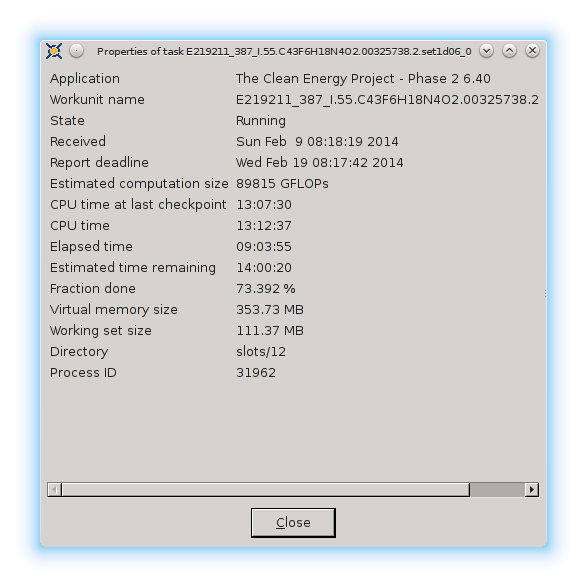 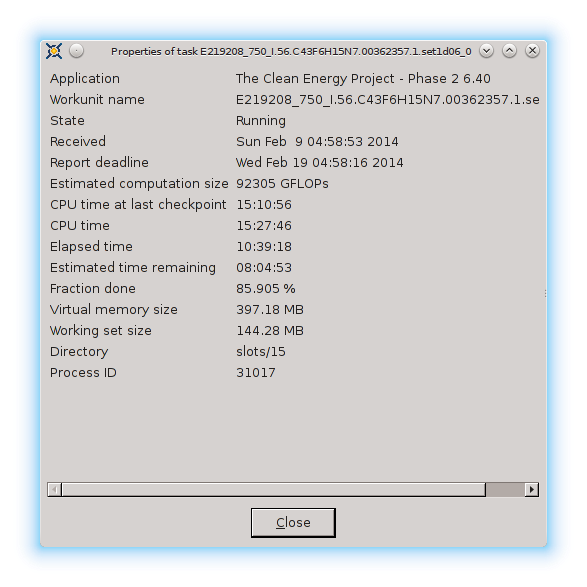 [Edit 2 times, last edit by Former Member at Feb 10, 2014 2:27:36 AM] |
||
|
|
Former Member
Cruncher Joined: May 22, 2018 Post Count: 0 Status: Offline |
After those WU were completed, the time showing in the stats (CPU Time vs Elapsed Time) matches, but does not match the Bonic_mgr elapsed time when the WU drops.
I will try a reboot to see if there is some issue with either the client or the mgr. Not that it really matters, as the ramdrive solved the real issue, now it is simply curiousity why the mgr shows a mismatch, but WCG shows that elapsed time == cpu time. If elapsed time is based off of the system clock, then there is an issue with the cpu time calculation, but I haven't used a stopwatch on a WU so cannot confirm. |
||
|
|
jonnieb-uk
Ace Cruncher England Joined: Nov 30, 2011 Post Count: 6105 Status: Offline Project Badges:
|
Jagaer One piece of information which I can't see you've told us - what version of BOINC are you running?
----------------------------------------Vers 7.0.64(Win)/7.0.65(MAC) are known to work well. 7.2.33 or later should used with caution. |
||
|
|
Former Member
Cruncher Joined: May 22, 2018 Post Count: 0 Status: Offline |
If CPU time > Elapsed time, then something is wrong. I have never seen this on my computer, so I wonder if this can happen if you have to restart at a checkpoint. Does a checkpoint reset elapsed time but not necessarily CPU time?
|
||
|
|
|