| Index | Recent Threads | Unanswered Threads | Who's Active | Guidelines | Search |
 |
World Community Grid Forums

 Category: Support

 Forum: BOINC Agent Support
 Thread: Cannot install BOINC 6. 2.28 as a service: reboot required
 |
| No member browsing this thread |
|
Thread Status: Active Total posts in this thread: 10
|

|
| Author |
|


|
Former Member
Cruncher Joined: May 22, 2018 Post Count: 0 Status: Offline |
I tried to upgrade BOINC 5 to the latest version on a machine running Windows Server 2003 x86 SP2 (not R2). Unfortunately, I cannot start it: setup final screen says it won't start until after a reboot, and it is darn right, as I cannot start the service manually. Rebooting the machine is not an option (unlikely in a next few months). Is there a way to install this new version such that reboot is not required?
----------------------------------------edited for profanity - ErikaT [Edit 1 times, last edit by ErikaT at Oct 19, 2009 3:46:26 PM] |
||
|


|
Sekerob
Ace Cruncher Joined: Jul 24, 2005 Post Count: 20043 Status: Offline |
Yes, uninstall/reinstall and just untick the service/protect box and select all users. Then it will run only as regular application that shuts down when closing session. But I think if you install as service/protect, all users you can start the service under 6.2
----------------------------------------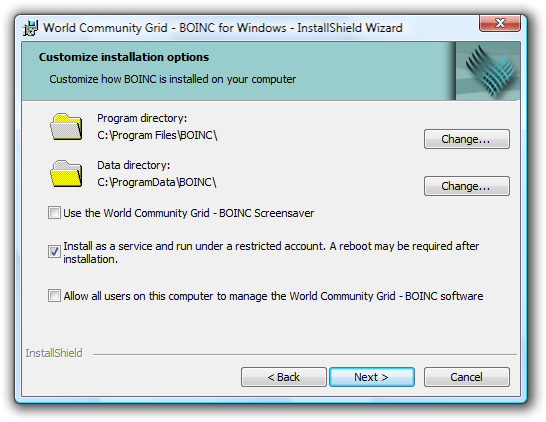 The reboot is needed in service scenario as this is the first release that creates special limited BOINC accounts under which the service runs. Future 6.10 will always run BOINC as a service/daemon even if manually started from a user session, that has permission of course.
WCG
Please help to make the Forums an enjoyable experience for All! |
||
|
|
Former Member
Cruncher Joined: May 22, 2018 Post Count: 0 Status: Offline |
Thank you for the response. This is not a viable option, as normally nobody is logged on on the server.
When version 6.10 is coming out? Should I just wait? Why is rebooting the computer necessary? None of the actions setup is performing requires rebooting a computer per se: creating a user account, creating a service, changing directory ACL and, finally, starting the service. I can complete the configuration manually, if you give me a few pointers. |
||
|
|
Former Member
Cruncher Joined: May 22, 2018 Post Count: 0 Status: Offline |
Whatever I try to do, I get an error "5 Access Denied" when I am attempting to start the service. There are users boinc_master and boinc_project created, along with 3 security groups:
|
||
|
|
Sekerob
Ace Cruncher Joined: Jul 24, 2005 Post Count: 20043 Status: Offline |
I fear that at any time an upgrade from 5.10 to any 6 a boot is required for these new limited BOINC accounts to take effect. Running as user not being an option it becomes catch 22, so suggest to stay with 5.10.45. You really don't need 6 plus is wont run presently on domain controllers unless following special install instruction. If your device is DC I can look to find them as they're somewhere on these forums.
----------------------------------------
WCG
Please help to make the Forums an enjoyable experience for All! |
||
|
|
Former Member
Cruncher Joined: May 22, 2018 Post Count: 0 Status: Offline |
A domain server but not a DC. I was able to run it finally, with a twist, but it runs. Do you think I should post the procedure I followed -- would it be of interest to others?
|
||
|
|
Sekerob
Ace Cruncher Joined: Jul 24, 2005 Post Count: 20043 Status: Offline |
Yes please, we'll add it to the wiki and or FAQ's.
----------------------------------------With emphasis, if not owner, get owner permission, to run BOINC :D Edit: Professionals using servers also use ThreadMasterGUI for optimal thread control if that has interest.
WCG
----------------------------------------Please help to make the Forums an enjoyable experience for All! [Edit 1 times, last edit by Sekerob at Oct 18, 2009 9:02:28 AM] |
||
|
|
Former Member
Cruncher Joined: May 22, 2018 Post Count: 0 Status: Offline |
Installation of BOINC 6.2.28 on Windows Server 2003 SP2.
I. Prerequisutes You are installing BOINC 6.2.28 on a machine running Server 2003 SP2. You have console access to the server, possibly via an administrative Remote Desktop connection. You must be a local administrator on the server. The server may be a domain member (but not a domain controller!). You do not need access to the domain. Also, you do not want to reboot the server. II. Installation First of all, read the Security section below. Depending on your configuration, you may want to prevent users from logging on to the server, shut down all non-system processes and services, and disconnect the server from network, by turning interfaces down or simply pulling out the cable. The system is in a very high security risk state from the moment you start the installer for the first time and until you will have security settings adjusted. First, install BOINC 6.2.28 normally. On the second screen, click the Advanced button and check the middle check box, install as a service. Un-check the bottom one, that enables management of BOINC by anyone, as this may expose the server to security risks in a non-obvious way. At the end of installation, you will be prompted to reboot. As you are not going to, anwer "No". Now go to Control Panel, Add/Remove software, select World Community Grid and unistall it. Run the installer the second time. Do not forget to click the Advanced button again, and select same options as the first time. Also, even if you are not changing the directory paths, take a note of them, as you will need the paths later. When the installation completes, you are no longer prompted to reboot. The BOINC service is not in a runnable state, however. We'll adjust security settings in a moment. III. Security The installer creates 3 local groups and 2 principals. These objects are given certain system-wide privileges, and default setup provides very high security risk to the server. You need to adjust these privileges before they can be potentially used for an attack. Why some of these settings are changed, I have not a guess. Some of them may be revoked and do not affect running BOINC. III.1. Adjust privileges To access privileges, run Local Security Settings tool (available through Administrative Tools in the Start menu), then navigate to Local Policies/User Right Assignemnt int the tree on the left. We'll go over changes made by the installer one by one, and revert some of them. YMMV: this worked for me, but might disrupt BOINC functioning for you. Also, do not trust me on the security risk assesment, and verify each statement: if I err, you do not want my mistake ruin your secure operations. 1. The Bypass Traverse Checking privilege is granted to boinc_admins, bonic_users and boinc_projects. This privilege is by default granted to Everyone, so security risk is none unless you have a very security-tight setup of a specialized server, but in this case you are not perhaps running BOINC on this server anyway. The grant is required. 2. The Create Global Objects privilege is granted to boinc_admins and bonic_users. Security risk: low. This privilege allows creating objects outside of your own Terminal Services session. If you are not running Terminal Services (administrative remote desktop connections do not count, we are talking full power TS here), it is ok to remove both accounts from the grant list. If you do, then it might be safe to leave that alone. 3. The Debug privilege is granted to boinc_admins and bonic_users. Security risk: very high. The privilege allows to debug any process in the system or the system kernel. This is granted to Administrators and Power users by default. The installer grants that permission to Everyone by way of boinc_users, which is a big security mishap. You should absolutely remove boinc_users from the grant list. It is possible that boinc_admins need the permission, if the service tries to debug worker processes, but I do not know if it is really required. You may try to remove this one too: the Debug privilege is a very powerful one, and allows injecting and executing code into any runnig process, however privileged. If a malicious attacker hijacks the boinc_master account, he can do everything on the server he pleases. 4. Some Deny* lists are altered: the boinc_* accounts are denied some specific types of logon. Security risk: negative. Leave these alone. 5. The Log On As Service is granted to boinc_master and boinc_project accounts. Security risk: none. This is a required grant, do not alter. 6. The Replace Process Level Token privilege. is granted to boinc_admins and bonic_users. Security risk: low/high. This privilege allows starting a process under a different security credentials. The BOINC service apparently uses it to start worker processes under the boinc_project account. Remove boinc_users from that list, as it improperly transitively grants the right to Everyone. III.2. Adjust directory security On the directory security part, there is one little problem in the default configuration: private BOINC files are inaccessible by the Local System account. This is not recommended, as it may prevent the files from being backed up, moved by a disk defragmenter and so on. You should consider granting Full Access to the Local System account on the private data directory, that you noted while installing BOINC. If the operating system is installed with default settings, and you have not selected a different directory, the path will be C:\Documents and Settings\All Users\Application Data\BOINC. You might not be able to access it in Windows Explorer, unless you enable access to hidden and system files through Explorer's Tools/Options dialog. To do that, select properties of the BOINC folder, choose Properties…, Security tab, click Add…, type SYSTEM, click OK, check Full Control in the Allow column, click OK in the Properties dialog. III.3. Adjust group membership Last, the service apparently needs more object access than granted by the installer. We'll need to fix that. I simply added group membership in the Users group to the BOINC service account. That was enough to enable the service to run. Any access grant is a security risk to the system, but this one is fairly low, considering that you are granting access to a very well behaved service. Start the Computer Management tool from Administrative Tools, and navigate to Local Users and Groups/Users in the tree. Double-click the boinc_admins user, go to the Member Of tab, Click Add, type Users, click OK to add Users to the memberhip list, and another OK to close the user properties dialog. Next, remove unnecessary users from the boinc_users group. You should definitely remove Everyone from it, because boinc_users is still a highly privileged group. It is a good idea to add only administrators to it. Since a local group cannot be a member of another local group, you will have to add specific users, but not gropus, to the boinc_users group (domain groups may be added, however). Go to Local Users and Groups/Groups in the left pane. Double-click boinc_users, Highlight Everyone (must be the only entry in the list), and click Remove. Now click on Add, type your own user name and click OK to add it. Add another managers only as necessary. At this point, you can re-enable user access to the server, as obvious security configuration problems should have been fixed. IV. Run the service and manager application Now the service should be able to run. In the same tool, expand Services and applications node, select Services in the tree pane, highlight a service named BOINC in the list on the right and click on the start button on the toolbar. The service should start with no errors. Then run the BOINC manager application. Verify that the worker processes are actually running, using Task Manager. It may take up to 10 minutes before they are started, so wait long enough lest you could falsely decide you have a configuration problem. The processes should run under the boinc_project account. |
||
|
|
Sekerob
Ace Cruncher Joined: Jul 24, 2005 Post Count: 20043 Status: Offline |
freqimus, Outstanding, very much appreciated.
----------------------------------------
WCG
Please help to make the Forums an enjoyable experience for All! |
||
|
|
Former Member
Cruncher Joined: May 22, 2018 Post Count: 0 Status: Offline |
No problem.
|
||
|
|
|